Versions and moving campaigns
A sequence has versions. You can improve a sequence while campaigns are running on it: your edits go into a new version, and each campaign keeps the version it started with until you decide to move it.
| Status | What it means |
|---|---|
| Draft | Being edited. Nothing uses it. A sequence has at most one draft |
| Published | The current version. New campaigns start on it |
| Superseded | An older published version. Campaigns that started on it keep running on it |
Editing a published sequence
- Open the sequence from My Templates. It opens on its draft if it has one; otherwise the published version opens read-only.
- Click Edit. This opens the draft, or creates the next version as a draft — v4 · Draft, for example — starting from the published steps.
- Make your changes, Save, and Check sequence.
The header says where the draft came from and who is affected, for example from v3 · published 12 Sep · used by 2 running campaigns. Click the version pill to open Sequence versions and look at any earlier version read-only.
Publishing a new version
Click Publish v4.
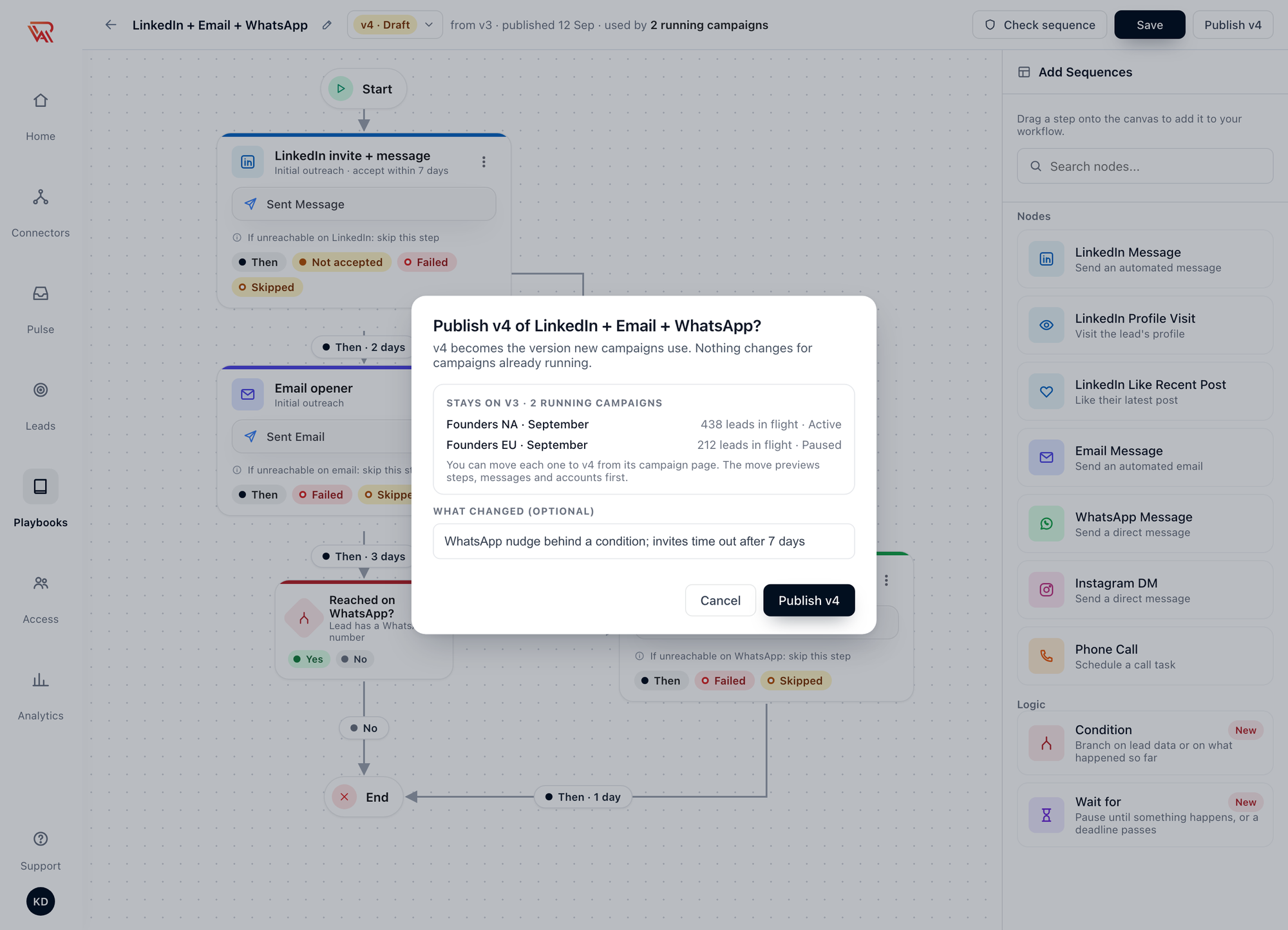
v4 becomes the version new campaigns use. Nothing changes for campaigns already running.
The dialog lists every running campaign that stays on the older version, with the leads in flight on each. Add a note under What changed (optional) — it helps whoever moves those campaigns later.
Publishing never changes a running campaign. A campaign is tied to the version it had when it was approved, and it keeps it until you move it.
Moving a campaign to a new version
When a newer version is published, the campaign's Campaign details show it in the Sequence row: the campaign's version, View, and Move to v4, with a line such as v4 available · published 24 Sep. Moving is offered for active and paused campaigns.
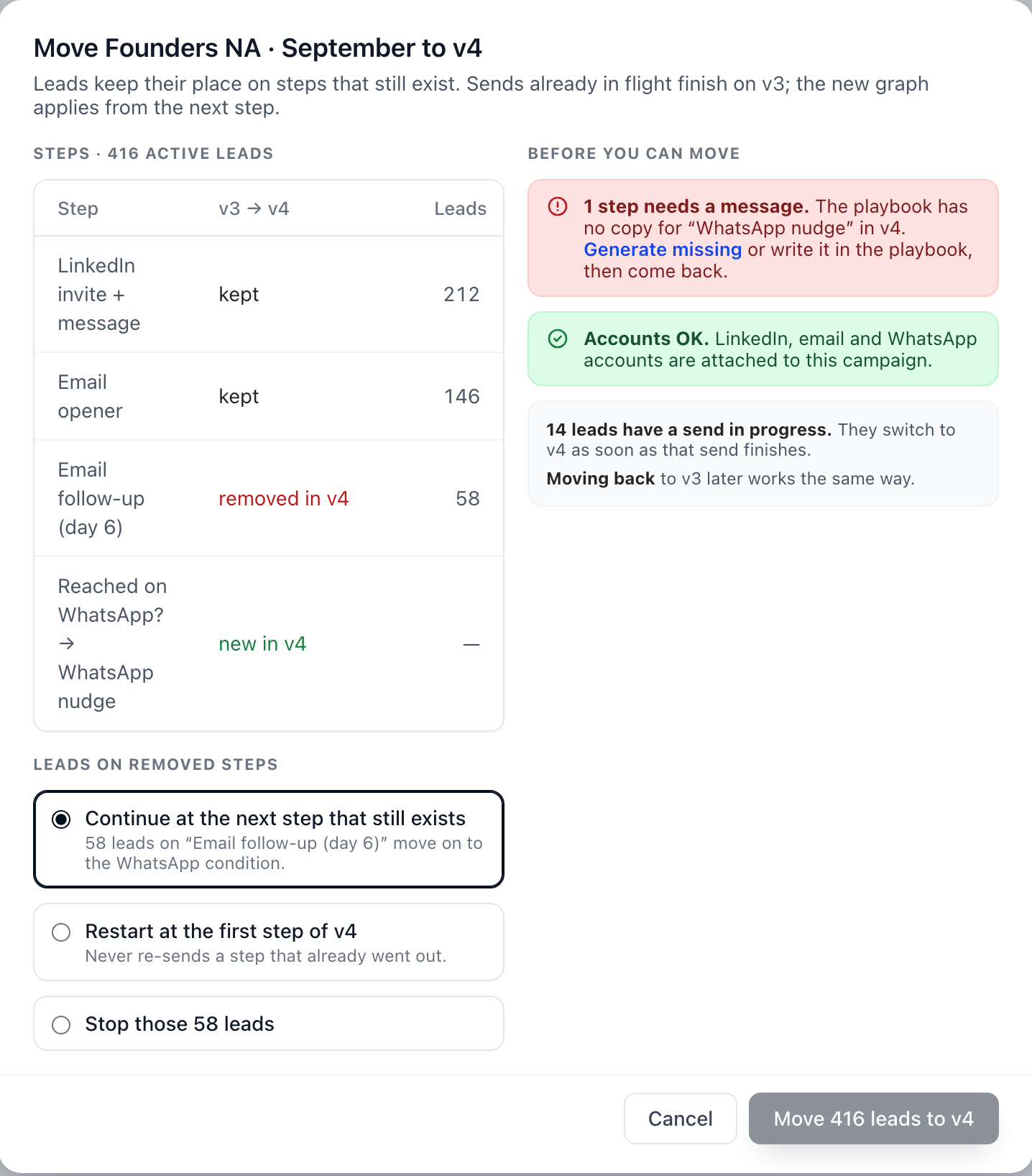
Move to v4 opens a preview before anything changes:
| Section | What it tells you |
|---|---|
| Steps | Every step, whether it is kept, removed in v4 or new in v4, and how many active leads are on it |
| Leads on removed steps | What happens to leads sitting on a step v4 no longer has |
| Before you can move | What must be fixed first, and what is already fine |
For leads on removed steps, choose one:
| Option | What happens |
|---|---|
| Continue at the next step that still exists (default) | They pick up at the first step after theirs that v4 still has |
| Restart at the first step of v4 | They start over. A step that already went out is never sent again |
| Stop those leads | Their sequence ends |
Leads on steps that still exist keep their place. A lead with a send in progress finishes it on the old version and switches as soon as it is done.
The move is blocked until:
- every step of the new version has a message in the campaign's playbook — use Generate missing, or write them in the playbook, then come back
- the campaign has an account for every channel the new version sends on
After the move, leads the old version couldn't reach are checked again, so a new channel in v4 can enroll leads that were Not reachable.
Messages for each version
The playbook keeps messages per step, and each version can have steps the others don't. The Outreach Sequence tab of the playbook shows this.
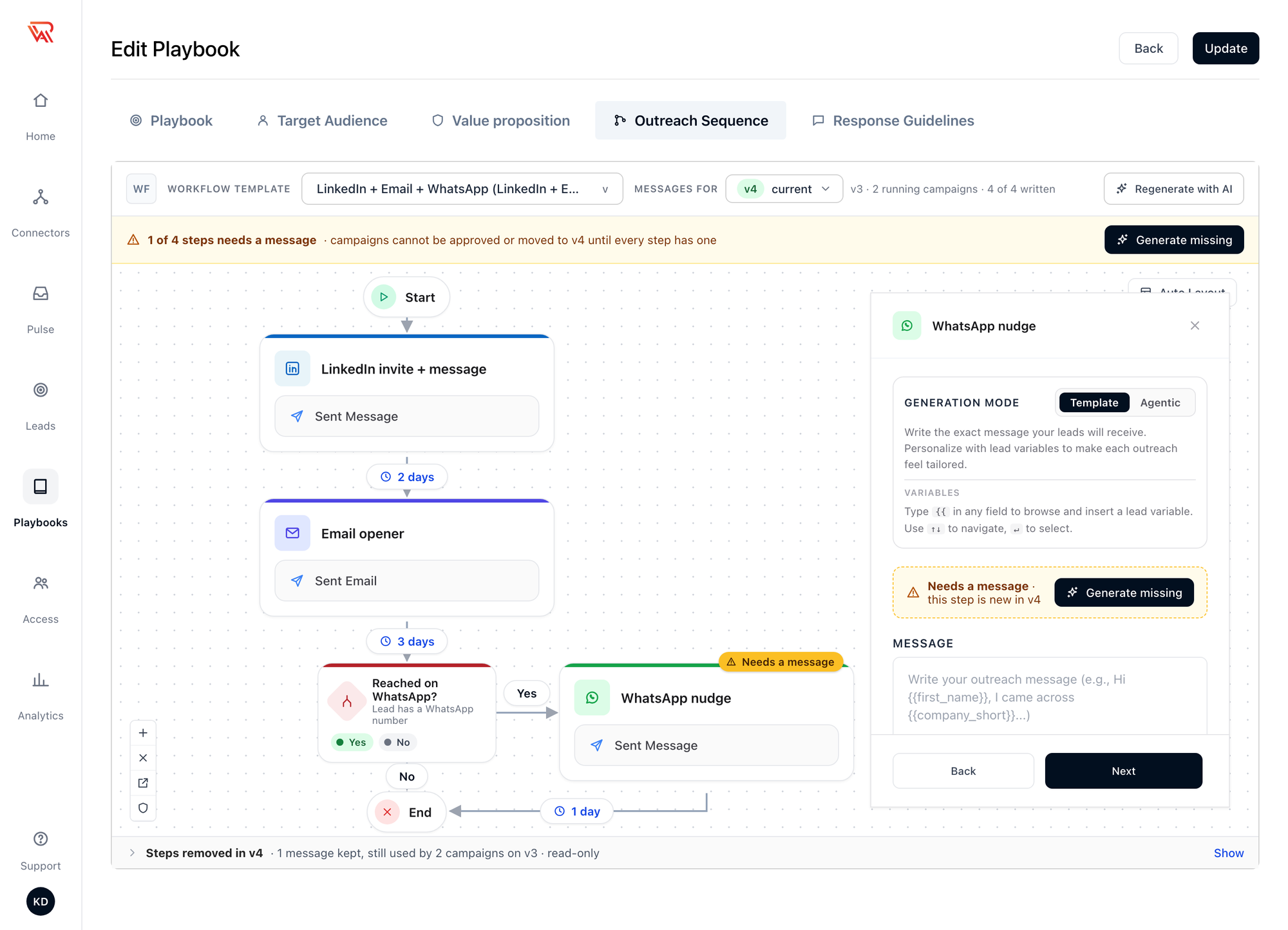
- Messages for picks the version you are writing for: the current version, plus every version a running campaign still uses.
- A strip counts the steps without a message — 1 of 4 steps needs a message — with Generate missing to write just those from your playbook.
- A step that is new in this version is marked Needs a message until it has one.
- Steps removed in v4 lists messages kept for steps only an older version has, while a campaign still runs on it. They are read-only, and they stay until no running or paused campaign needs them.
A campaign can't be approved, or moved to a version, until every step of that version has a message.
Deleting a sequence
Deleting a sequence deletes every version of it. It is refused while any campaign uses one of its versions.
Sequences made before smart sequences
Sequences you published before outcome ports, Conditions and versions arrived keep working exactly as they did. Each one is now version 1, and every campaign that uses it stays on version 1.
When you open one, it is shown the new way: each delay between two steps is a Then line with the same wait, and a Failure branch you had is a Failed line. Nothing changes for running campaigns until you publish a new version and move them to it.
Publishing a new version turns on the new behaviour for campaigns on that version:
| Version 1 | Versions published since | |
|---|---|---|
| Leads missing a channel | A lead had to have every channel the sequence sends on to be enrolled | Each step skips a lead it can't reach (or stops, if you set it to); a lead needs just one channel, and the rest stay Not reachable until one arrives |
| A step that fails | The lead moved on to the next step anyway | The lead takes Failed; with no Failed line, it stops |
| Answer to your invite note | Treated like a reply unless it looked like a courtesy note | Continues the sequence by default. See Replies to your connection request |
| Bounced email | Retried | Fails the step |
| Conditions, Wait for, acceptance windows | Not available | Available |
Before you move a busy campaign, check the new version's Failed routes: a step that used to carry on regardless now stops leads unless you connect Failed somewhere.
The older predefined templates now have a new version with a 7-day acceptance window on their connection requests, and every step set to skip leads it can't reach. Campaigns that were already running on them stay on the version they started with.
Related
- Sequence overview
- Create a sequence
- Active campaign — lead progress and Not reachable leads
- Build manually — writing messages for each step