Predefined templates
RagWorks publishes five ready-made sequences, one for each channel mix. They are the ones Quickstart builds your first campaign on, and you'll find them under Sequences → Predefined Templates.
| Template | Channels | Length |
|---|---|---|
| LinkedIn only | About 3 weeks | |
| Email only | About 2 weeks | |
| LinkedIn + Email (recommended) | LinkedIn, email | About 3 weeks |
| LinkedIn + Email + WhatsApp | LinkedIn, email, WhatsApp | About 3 weeks |
| LinkedIn + Email + WhatsApp + Phone | All four | About 3 weeks |
What they have in common:
- No copy is built in. The sales strategy on your playbook writes every message, so the same template works for any strategy.
- Every step skips a lead it can't reach. A lead with no email still gets the LinkedIn steps, and the other way round.
- LinkedIn opens with a profile visit a day before the connection request.
- A follow-up email is never sent without the opener before it.
- WhatsApp only goes to a lead who opened your email and has a number, and the AI call only to a lead who then read the WhatsApp message.
- Every route ends with a break-up message, on each channel the lead is on.
- A reply or a booked meeting on any channel ends the sequence, as always.
Where the Connection request step is available to your organization, the templates that send on LinkedIn use it: Connection request, then Wait for connection, then the first LinkedIn message a day after the lead accepts. The wait's deadline takes the place of the acceptance window (3 days with email, 30 days on LinkedIn only), and a lead who doesn't accept in time takes Timed out.
To use one outside Quickstart, open it, click Preview Workflow, then Save to copy it into My Templates. See Create a sequence.
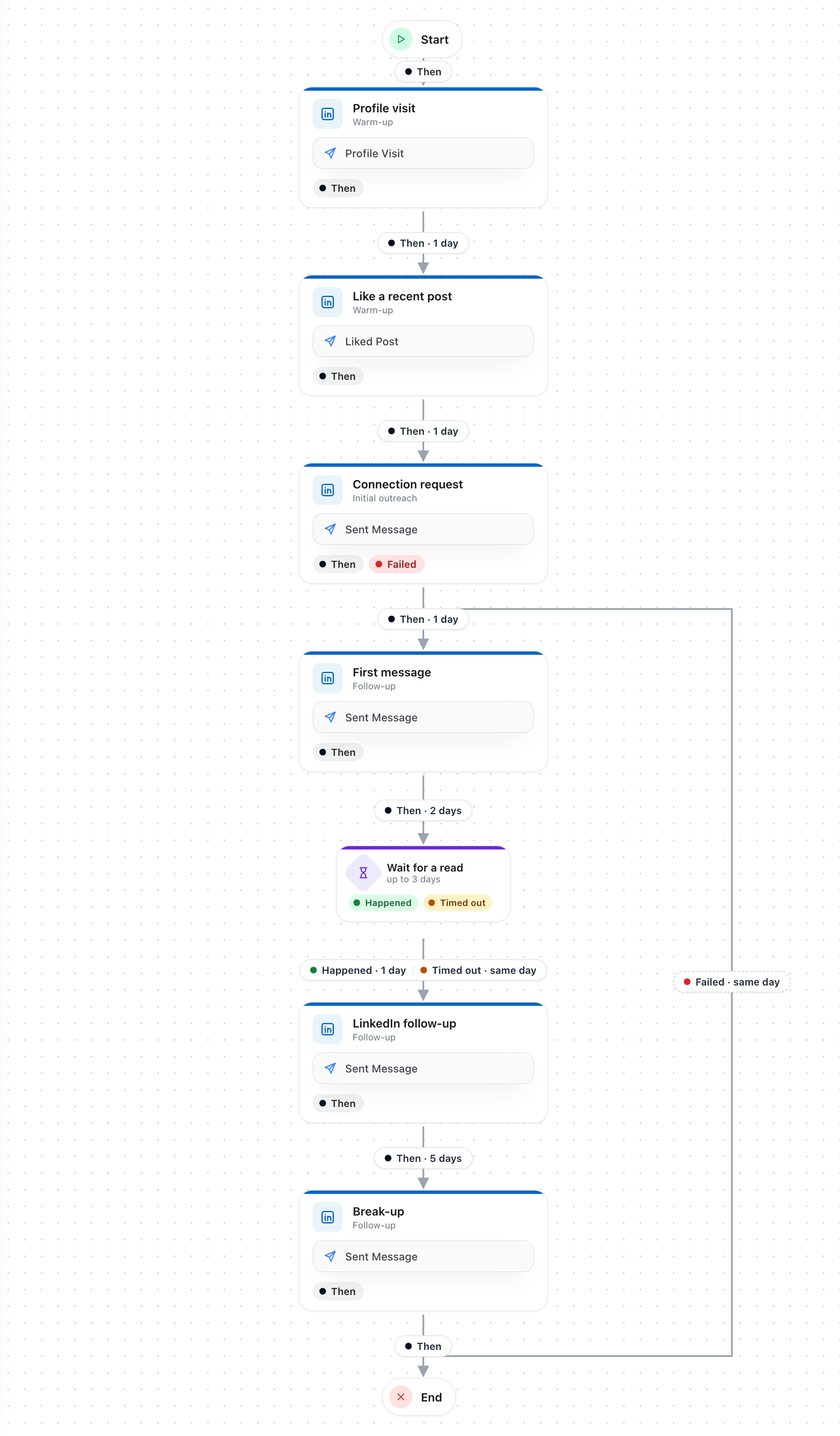
LinkedIn only
Warm up, connect, then follow up in messages.
- Profile visit, then a like on a recent post the next day, then the connection request the day after.
- The connection request has no acceptance window: on LinkedIn only, a pending invite just waits. An invite LinkedIn refuses ends the sequence.
- A day after they accept, the first message. Two days later, a Wait for Message read of up to 3 days: a lead who read it gets the follow-up a day later, one who didn't gets it when the wait ends.
- The break-up message five days after the follow-up.
Needs: a LinkedIn account. Nothing is enriched.
Email only
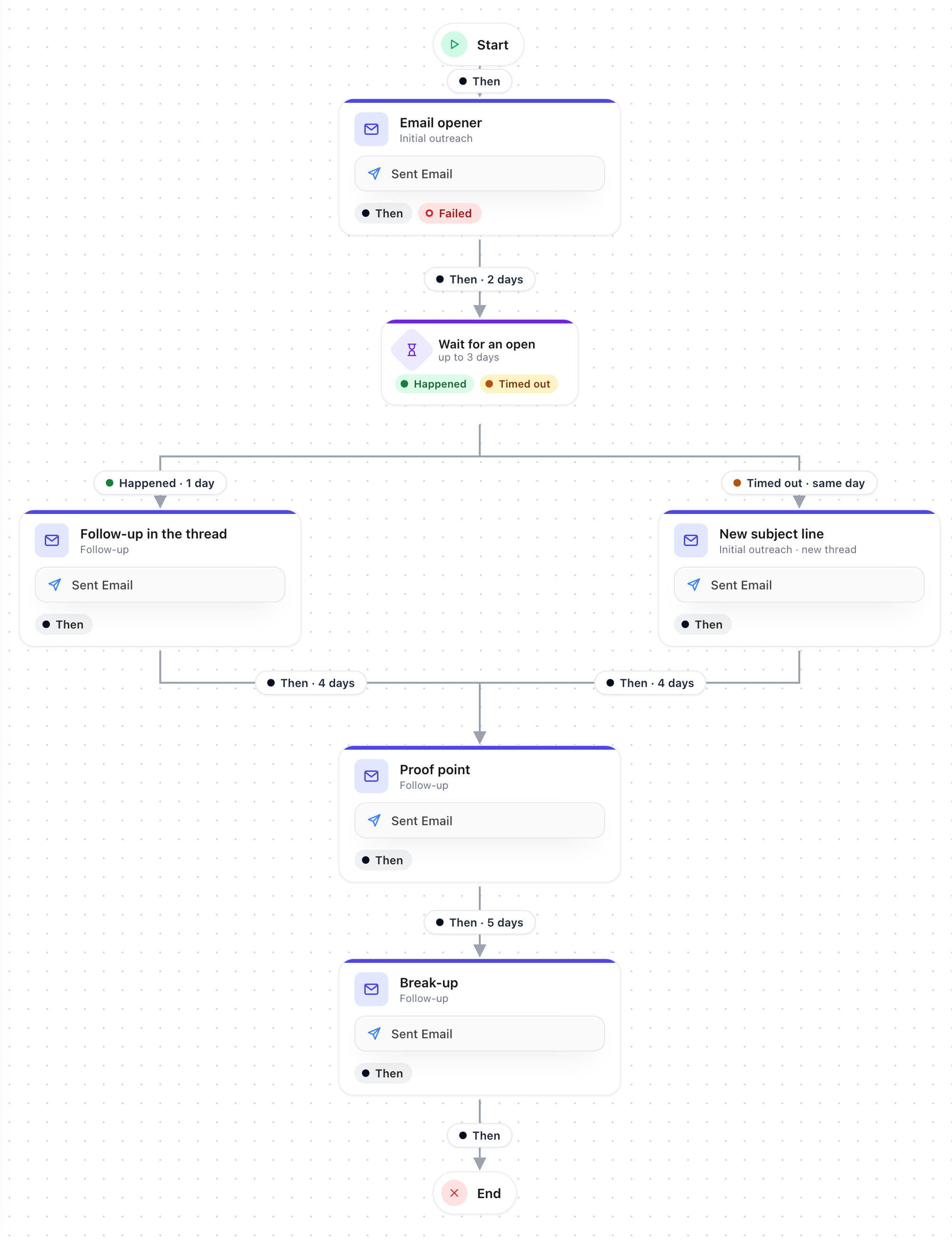
An opener, a new angle if it goes unopened, proof, then a break-up.
- The email opener, then two days later a Wait for Email opened of up to 3 days.
- Opened: a follow-up in the same thread a day later. Not opened: a new subject line that starts a fresh thread.
- A proof point four days later, then the break-up five days after that.
Needs: an email account, and work emails for your leads.
LinkedIn + Email
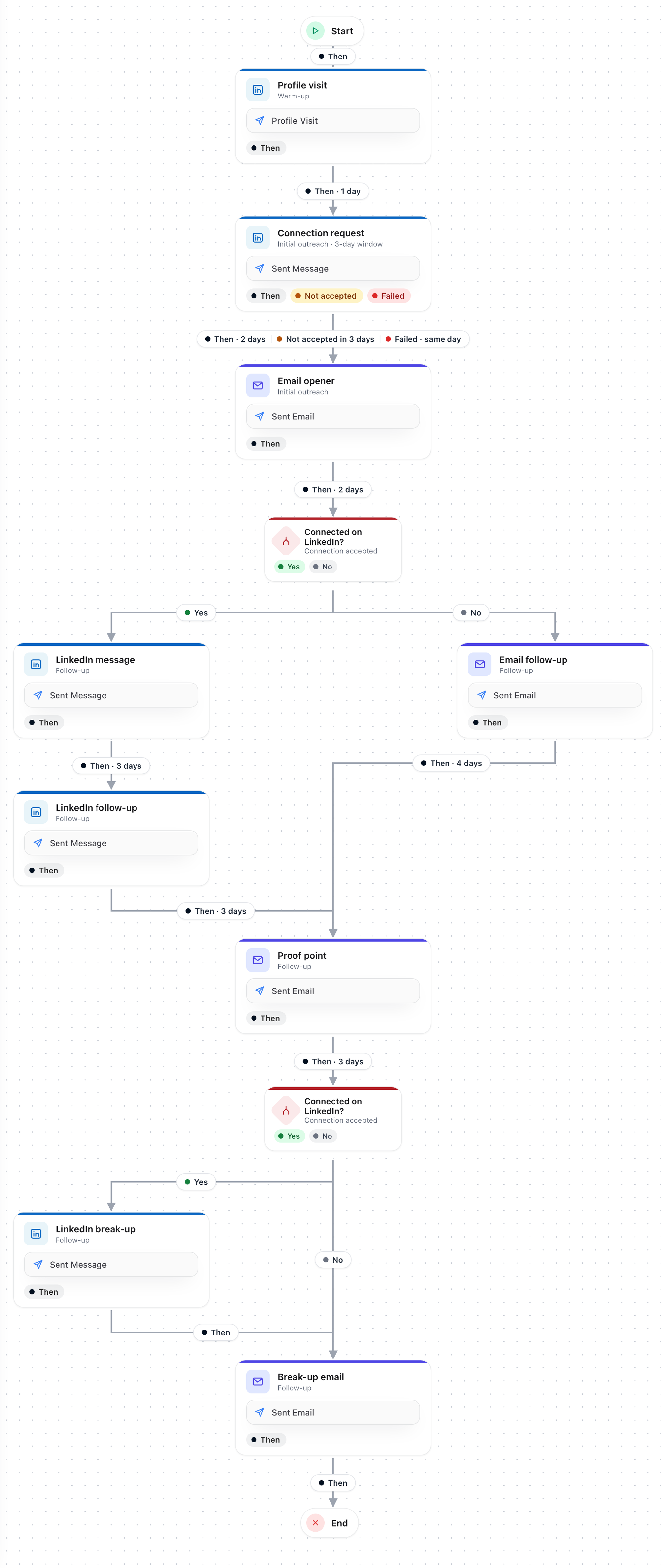
LinkedIn follow-ups once they connect, email until they do, and a break-up on both. The recommended default.
- Profile visit, then the connection request the next day, with a 3-day acceptance window.
- The email opener goes out to everyone: two days after they accept, or the same day the window ends (Not accepted in 3 days) or LinkedIn refuses the invite.
- Two days later, Connected on LinkedIn?
- Yes: a LinkedIn message, then a LinkedIn follow-up three days later.
- No: an email follow-up in the thread.
- Both routes meet at a proof-point email, then check Connected on LinkedIn? again: connections get a LinkedIn break-up and a break-up email; everyone else gets the break-up email.
Needs: a LinkedIn account and an email account.
LinkedIn + Email + WhatsApp
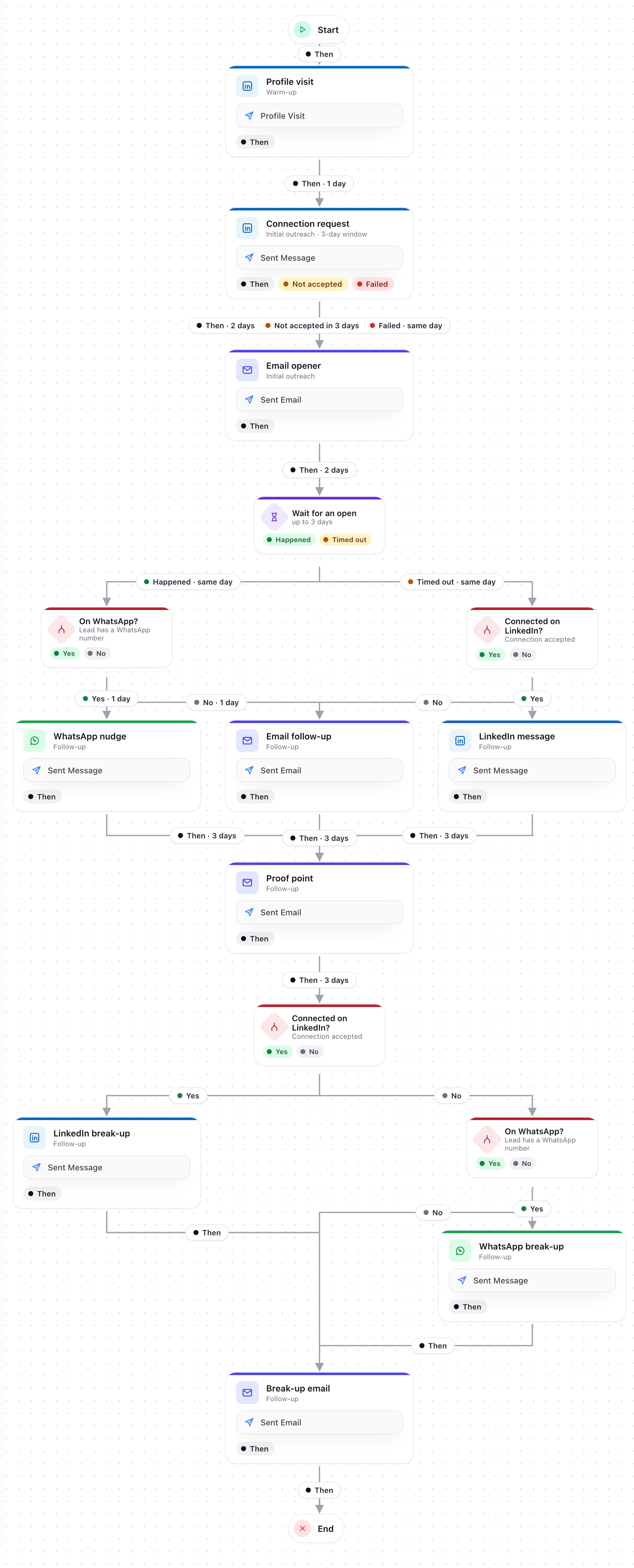
Three rounds of follow-ups, each on the best channel the lead has, and a break-up on every one.
- The same opening as LinkedIn + Email: profile visit, connection request with a 3-day window, email opener.
- Two days after the opener, a Wait for Email opened of up to 3 days.
- Opened: On WhatsApp? A lead with a number gets a WhatsApp nudge the next day; one without gets an email follow-up.
- Not opened: Connected on LinkedIn? Connections get a LinkedIn message; everyone else gets an email follow-up.
- A proof-point email three days later.
- The close: connections get a LinkedIn break-up, leads on WhatsApp a WhatsApp break-up, and everyone a break-up email.
Needs: LinkedIn, email and WhatsApp accounts. Quickstart looks up missing emails and mobile numbers.
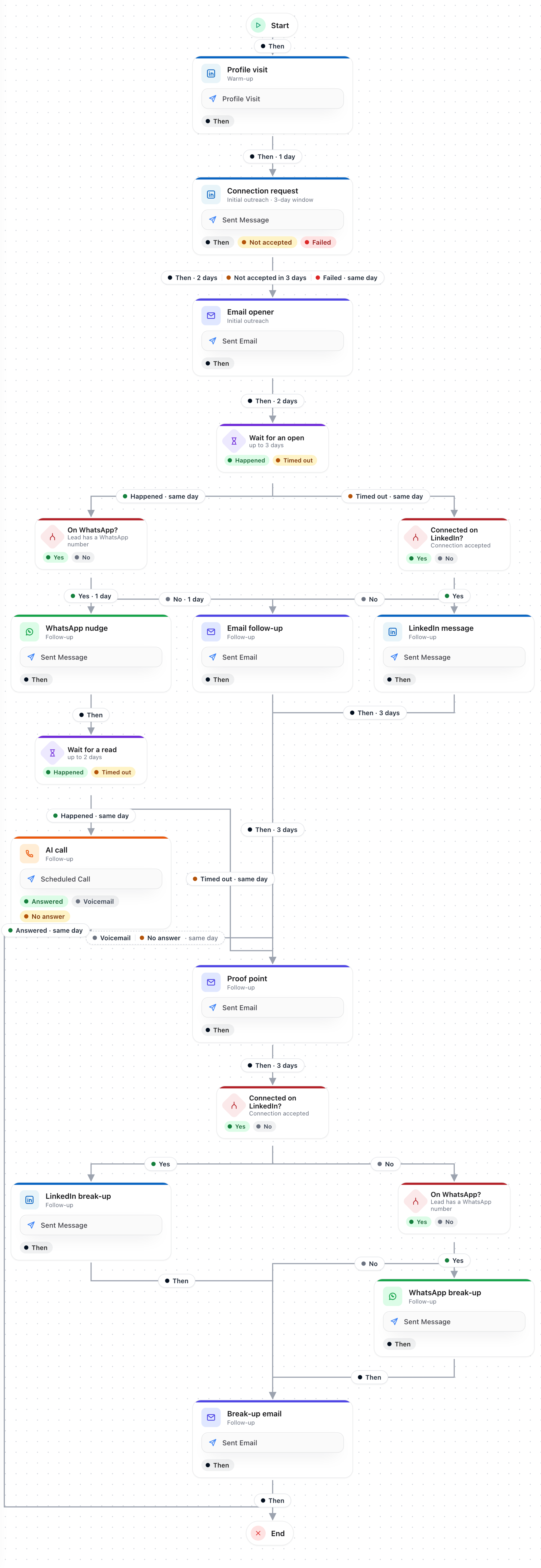
LinkedIn + Email + WhatsApp + Phone
Adds an AI call for leads who opened your email and read your WhatsApp.
The same as LinkedIn + Email + WhatsApp, with one more round for the most engaged leads. After the WhatsApp nudge, a Wait for Message read of up to 2 days:
- Read: your AI voice agent calls them.
- Answered: the sequence ends; the conversation took place.
- Voicemail, No answer, or a call that could not be placed: the proof-point email the same day, and the sequence carries on.
- Not read: straight on to the proof-point email.
Needs: LinkedIn, email and WhatsApp accounts, and a phone number for AI calls. Quickstart looks up missing emails and mobile numbers.
Other templates
Predefined Templates also lists older templates and ones RagWorks adds over time. Open any of them to read its description and see its steps before you save a copy.
Related
- Sequence overview
- Conditions and waits
- Quickstart setup
- Sales strategies — the strategy writes each template's messages