Predefined Sales Strategies
When generating outreach messages for a playbook sequence, Predefined Sales Strategies let you choose a proven copywriting methodology to shape the entire sequence. Rather than treating each email or direct message as an isolated template, the AI writes the complete sequence as one coherent narrative arc that gradually escalates value and commitment across steps.
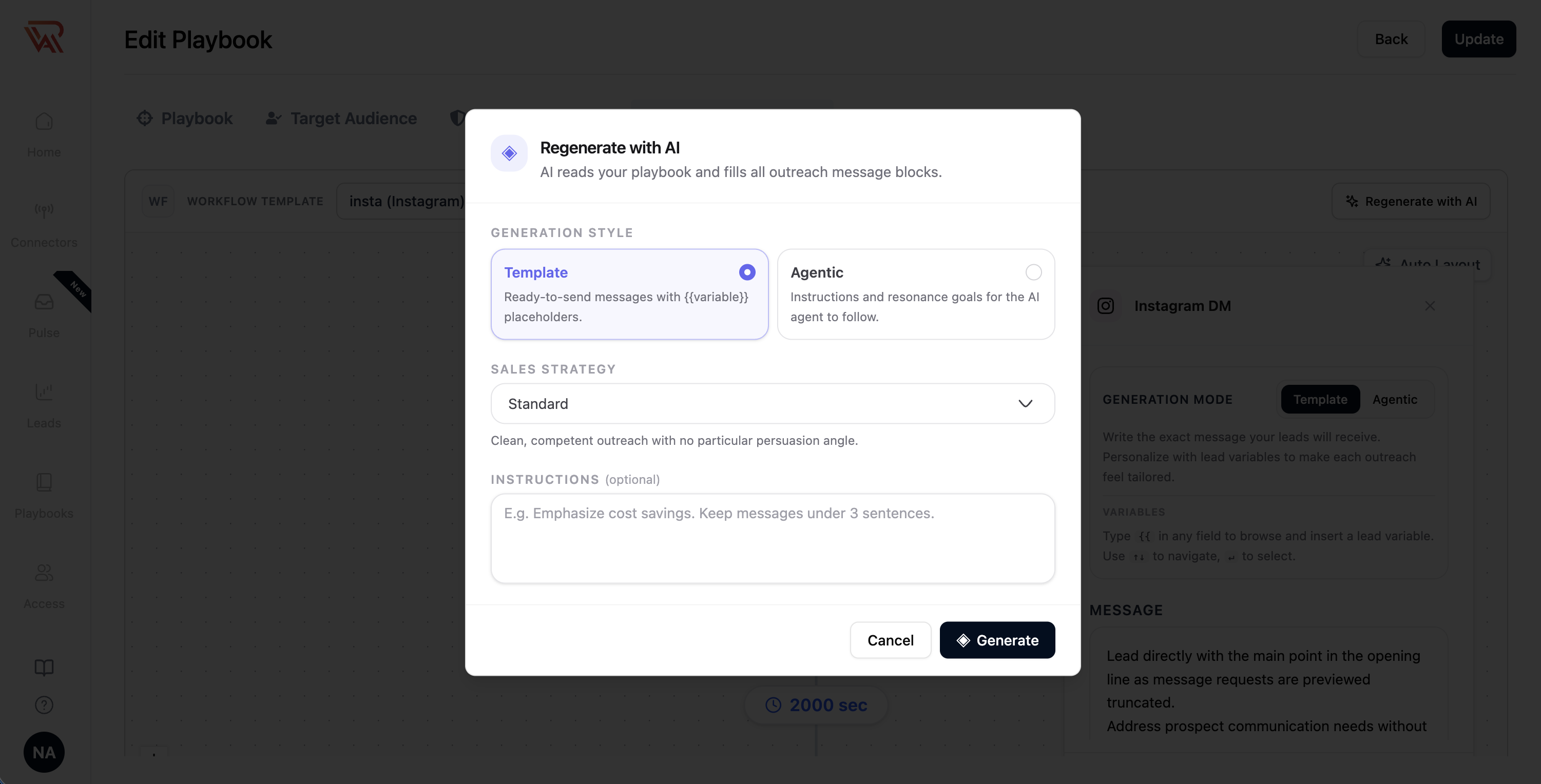
Predefined sales strategies are available in the Outreach Sequence tab when using Regenerate with AI. Not sure which one fits? Compare up to three side by side before you choose.
Why Use a Sales Strategy?
Traditional automated sequences often repeat the same value proposition across multiple follow-ups, resulting in repetitive "just circling back" messages that prospects ignore.
Predefined sales strategies solve this by enforcing:
- A Unified Narrative Arc: Every touchpoint builds on the preceding one, introducing fresh angles, proof points, or perspectives without restating prior points.
- Gradual Commitment Escalation: Early steps focus on low-friction engagement (soft questions, sharing insights, or validating relevance); only the final step makes a direct meeting or demo request.
- Channel-Aware Formatting: The engine respects the unique nature of each channel—keeping email subjects under 6 words, LinkedIn DMs under 500 characters, and chat channels (WhatsApp, Instagram) ultra-concise.
- Safe Variable Fallbacks: If certain lead or campaign fields (such as case studies or trigger events) are not present in your context, the AI naturally writes around them rather than leaving unparsed placeholder tokens.
The 7 Predefined Sales Strategies
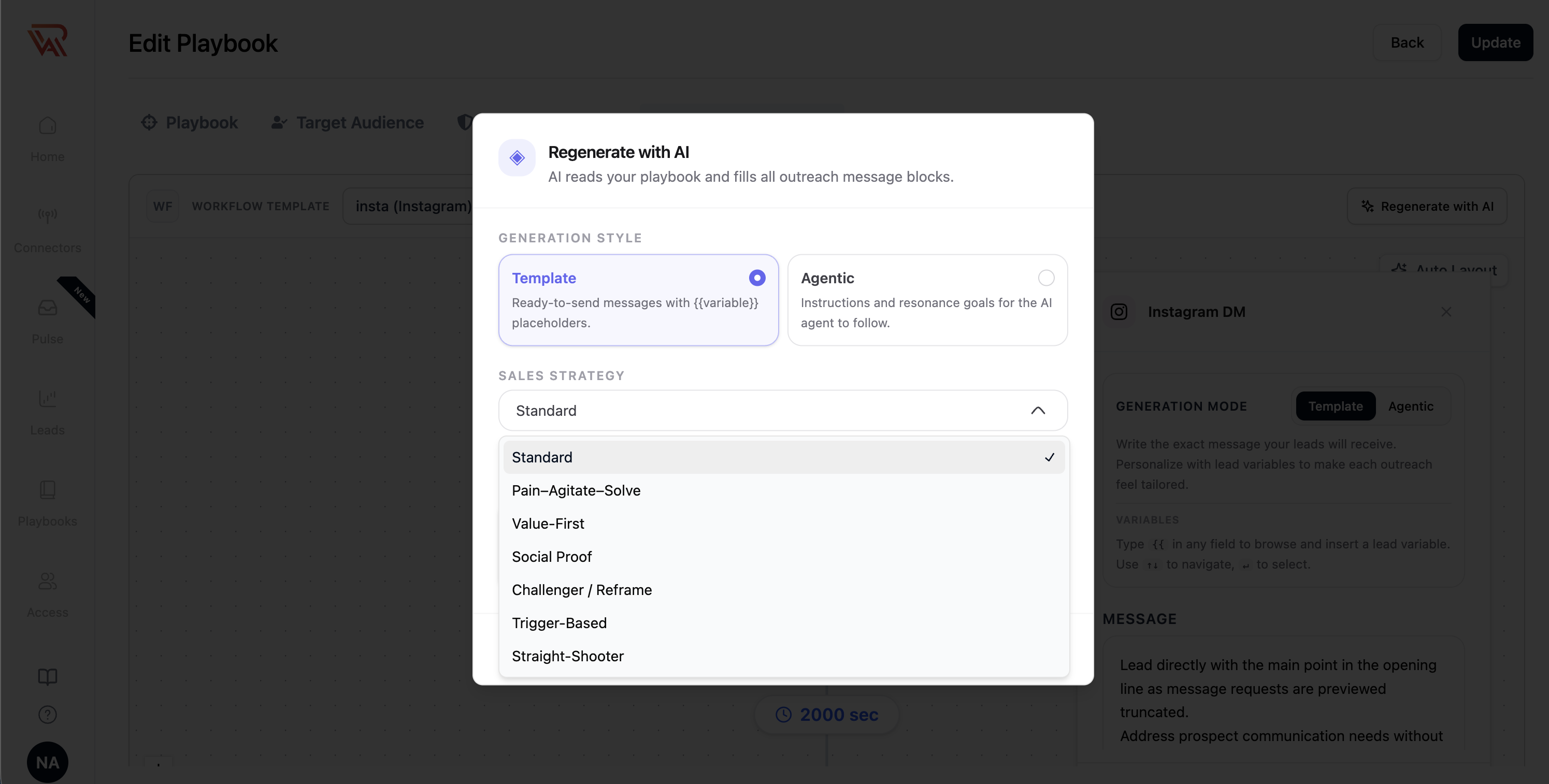
Ragworks provides seven curated sales strategies. Standard is selected by default, while the remaining six offer distinct persuasion frameworks suited for different buyer personas, industries, and campaign goals.
1. Standard (Default)
"Clean, competent outreach with no particular persuasion angle."
The Standard strategy is ideal when you want balanced, professional outreach that introduces your solution clearly without relying on aggressive persuasion tactics.
- Tone: Neutral, professional, objective.
- Length: ~70–90 words per email; proportionally shorter on direct message channels.
- Narrative Arc:
- Step 1 (Opener): Brief, relevant context on why you are reaching out to the prospect's company, a plain statement of what your company does, and a soft ask.
- Middle Steps: Each subsequent touch introduces one new, genuinely relevant point—such as a specific use case, a peer benchmark, or a question about their current setup—gently nudging toward the campaign goal.
- Final Step: A short, courteous, no-pressure close.
- Best For: Broad outbound campaigns, low-risk introductions, and standard B2B outreach.
2. Pain–Agitate–Solve
"Name a concrete problem, sharpen it, then resolve it with the value prop."
The Pain–Agitate–Solve (PAS) framework focuses directly on the operational friction, hidden costs, or missed revenue associated with the prospect's role.
- Tone: Peer-who-has-solved-this, empathetic, consultative (never sounding like an aggressive vendor).
- Length: ~80–100 words per email; proportionally shorter on direct message channels.
- Narrative Arc:
- Step 1 (Pain): Opens on a specific, concrete problem that professionals in this role and industry experience.
- Middle Steps (Agitate): Names and sharpens the consequences of inaction from fresh angles across touches (e.g., hidden costs, compounded team hours, compliance risk, or a "what this looks like in 6 months" projection).
- Later Steps (Solve): Briefly introduces your value proposition as the proven resolution to the agitated problem.
- Final Step: Contrasts "with vs. without" your solution and makes a clear call to action.
- Best For: Operational tools, cost-saving software, compliance platforms, and roles with high daily friction.
3. Value-First
"Every step delivers something useful even if the lead never replies."
The Value-First ("give before you ask") strategy builds trust upfront by providing genuine standalone utility in every message.
- Tone: Generous, low-ego, educational.
- Length: ~90–110 words per email; resources are described in prose rather than linked prior to step 3; proportionally shorter on direct message channels.
- Narrative Arc:
- Step 1 & Early Steps: Each touch delivers a distinct piece of standalone value—an industry benchmark, a teardown of how peer companies approach the problem, a tactical checklist, or a tailored observation about their company.
- Company Mention: Your company is mentioned only once per message, strictly in passing.
- Middle Steps: Soft interest check (e.g., a simple yes/no question regarding their experience with the shared data).
- Final Steps: Elevates to a low-friction meeting or exploratory ask once substantial value has been established.
- Best For: Senior executives (VPs, C-Suite), cold accounts in crowded spaces, and relationship-driven enterprise sales.
4. Social Proof
"Anchor each step on a comparable customer and a concrete outcome."
The Social Proof strategy builds credibility by anchoring outreach to verifiable customer success stories and peer results.
- Tone: Evidence-driven, believable, restrained (zero superlatives or hype).
- Length: ~80–95 words per email; proportionally shorter on direct message channels.
- Narrative Arc:
- Step 1 (Peer Headline): Introduces a comparable peer customer (same industry, similar team size or role) and highlights a concrete outcome (metric + timeframe + before/after).
- Middle Steps: Adds a second proof point, explains the "how" behind the peer's implementation, or shares an excerpt from a customer quote.
- Final Step: Offers to map the exact peer framework or result onto the prospect's company specifically.
- Safe Fallback: If your campaign context does not contain a specific case study, the AI automatically adapts to a "how teams of similar size in your industry achieve X" framing without fabricating names or fake metrics.
- Best For: Industries driven by peer validation (Fintech, Healthtech, Enterprise IT), and campaigns with strong customer metrics.
5. Challenger / Reframe
"Challenge a common assumption and teach something non-obvious."
Based on the Challenger sales model, this strategy challenges conventional wisdom in the prospect's industry and reframes their understanding of the problem.
- Tone: Provocative, insightful, credible (no flattery, no "quick question" clichés).
- Length: ~90–110 words per email; proportionally shorter on direct message channels.
- Narrative Arc:
- Step 1 (The Challenge): Challenges a widespread assumption buyers hold about the problem and shares a non-obvious insight.
- Middle Steps (The Evidence): Backs the reframe with data—emerging industry trends, hidden trade-offs of legacy workflows, or unaccounted costs. Reframes the root issue so your company's approach is the logical response.
- Later Steps: Connects the reframe directly to a plausible, specific gap at the prospect's organization.
- Final Step: Invites healthy disagreement or a brief conversation to pressure-test the concept together.
- Best For: Disruptive or category-creating products, displacing entrenched legacy vendors, and high-level decision makers.
6. Trigger-Based
"Build the opening on a timely event and explain why now."
The Trigger-Based strategy capitalizes on recent events, company milestones, or market shifts to establish immediate relevance and explain "why now."
- Tone: Timely, context-aware, alert (without artificial urgency).
- Length: ~80–95 words per email; proportionally shorter on direct message channels.
- Narrative Arc:
- Step 1 (The Trigger): Anchors the opening directly to an observed event (funding announcement, new key hire, product launch, regional expansion, job opening, or regulatory change) and ties it directly to the problem you solve.
- Middle Steps: Introduces a secondary signal or highlights what typically occurs for similar organizations immediately following this milestone.
- Final Step: Proposes a specific, low-commitment conversation tailored to their current growth phase.
- Safe Fallback: If no specific trigger event is present in the lead context, the AI falls back gracefully to a role-based observation with modest, authentic personalization.
- Best For: Intent-based outreach, trigger-fed lead lists (funding rounds, job board scrapes), and fast-growing startups.
7. Straight-Shooter
"Short, direct, honest that this is cold outreach."
The Straight-Shooter strategy cuts through inbox noise by being completely transparent about cold outreach and getting straight to the point.
- Tone: Direct, candid, respectful of time.
- Length: Under 60 words per email; skimmable in under 10 seconds.
- Narrative Arc:
- Step 1 (Ultra-Direct): One line of context, one line explaining why their company was chosen, and one simple ask. No hype, no fluff, no emoji.
- Middle Steps: Adds exactly one distinct reason to care, followed by the same concise ask.
- Final Step (Clean Breakup): A polite, professional closing: "I'll stop here — if this moves up your priority list, simply reply and I'll pick it back up."
- Best For: Extremely busy executives (Founders, CEOs, CTOs), technical audiences who dislike traditional sales copy, and high-velocity outreach.
Strategy Comparison Matrix
| Strategy | Primary Persuasion Angle | Tone | Avg. Email Length | Best Lead Profile |
|---|---|---|---|---|
| Standard | Balanced value proposition | Neutral, professional | 70–90 words | General ICP, mid-market roles |
| Pain–Agitate–Solve | Pain amplification & resolution | Consultative peer | 80–100 words | Operations, Finance, Engineering |
| Value-First | Upfront standalone value & insights | Generous, low-ego | 90–110 words | Enterprise VPs, C-Suite, crowded markets |
| Social Proof | Verifiable customer case studies | Evidence-driven | 80–95 words | Risk-averse buyers, IT, Security |
| Challenger | Reframe industry assumptions | Provocative, insightful | 90–110 words | Innovators, VP/Directors, legacy replacement |
| Trigger-Based | Event milestone ("why now?") | Timely, context-aware | 80–95 words | Newly funded, hiring, or scaling teams |
| Straight-Shooter | High brevity, direct honesty | Candid, skimmable | Under 60 words | Founders, C-Level, technical leaders |
Compare Strategies
Compare strategies shows you how different strategies would write the same sequence, so you can read the messages before you pick one.
- Open the playbook and go to the Outreach Sequence tab. Choose a sequence if you haven't yet.
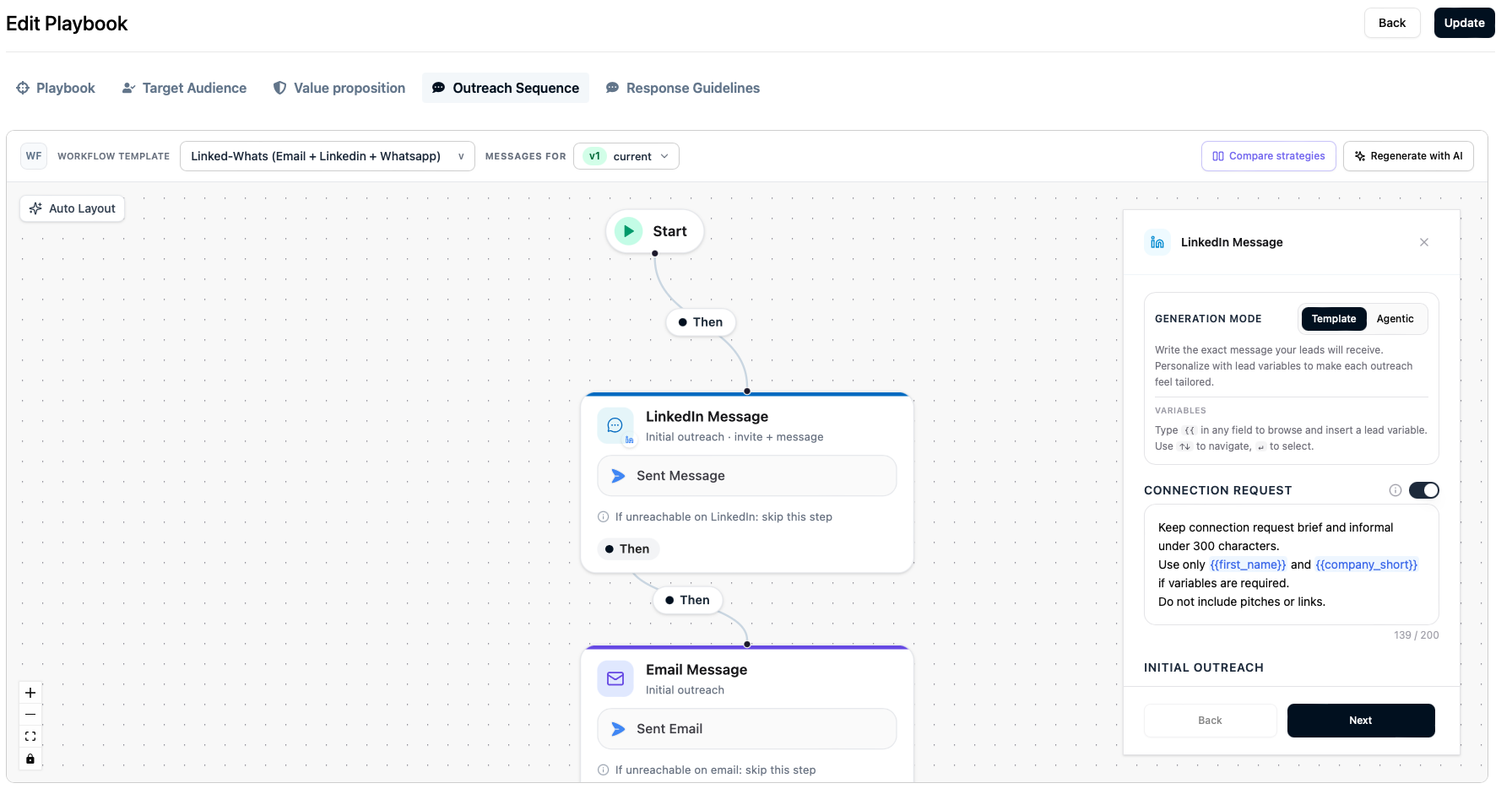
- Click Compare strategies next to Regenerate with AI. Hover over either button to see what it does.
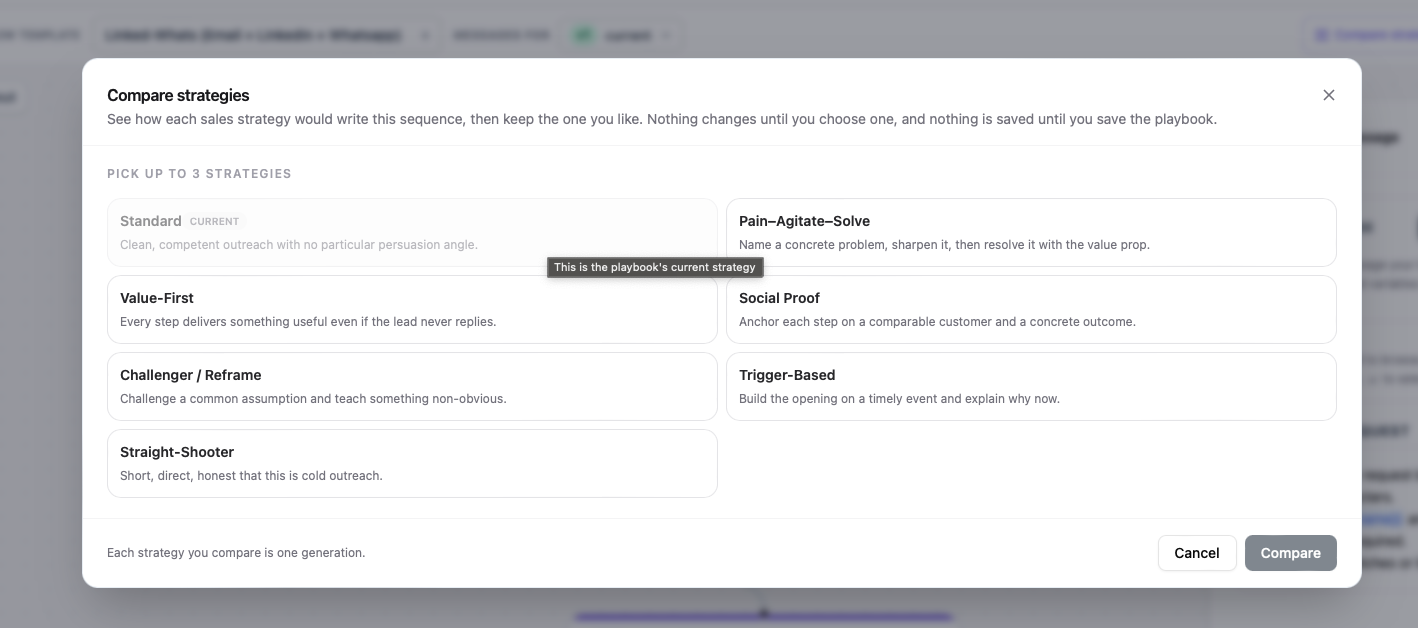
- Pick up to three strategies and click Compare. Your playbook's current strategy is greyed out, because comparing it against itself would only repeat the Current column.
- Read the results. Each step is a row, with the messages it has today in the first column and one column per strategy. A step that has a connection request shows it in its own box, followed by the message sent after they accept. An email shows its subject and its body.
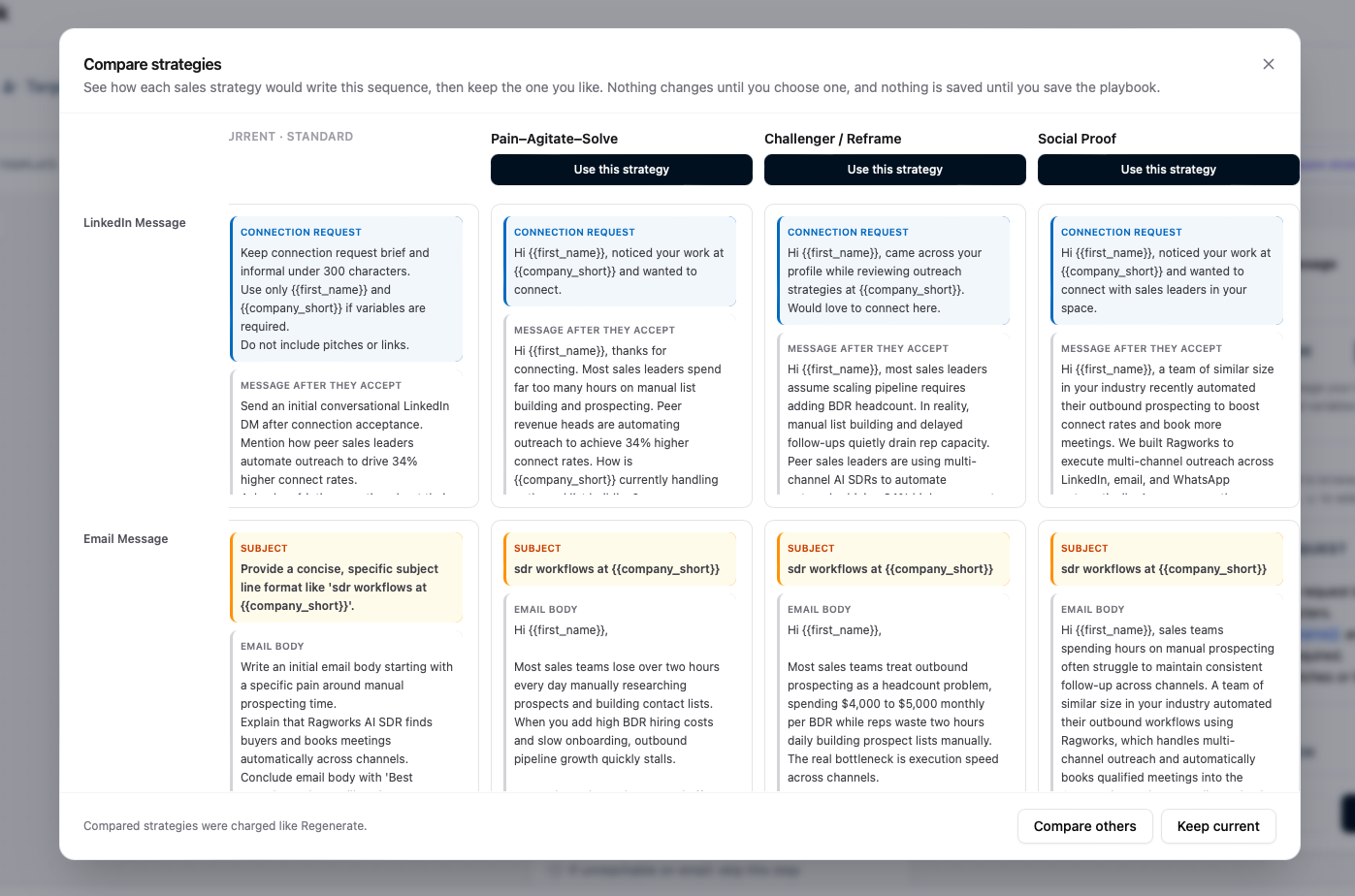
- Click Use this strategy on the column you like.
Using a strategy replaces the messages in the playbook with that column's messages and makes it the playbook's strategy. Nothing is saved until you save the playbook, so you can still leave without keeping it. The strategy you were on takes the place of the one you chose, with the messages the playbook had before, so you can switch back with one click. Keep current closes the comparison and changes nothing. You can also close it with the X at the top.
Each strategy you compare is one message generation and uses credits, the same as Regenerate with AI. Comparing three strategies is three generations. Closing the dialog while a strategy is still writing does not stop it.
If one strategy fails, the others still finish. Click Try again on the failed column to run just that one.
Compare strategies tells you how the messages read. It does not tell you which one gets more replies. To find that out with real leads, run an A/B experiment across playbooks that use different strategies.
Your First Sequence
The first time you open the Outreach Sequence tab on a playbook with no messages, Ragworks walks you through it:
- The sequence picker opens, so you can choose a sequence.
- Generate with AI opens next, with the sales strategy chooser on it.
- Pick a strategy and generate. Every message in the sequence is written in that strategy.
If you close either step, it doesn't open again until you next visit the tab. You can always start the same steps yourself with Generate with AI on the tab.
The playbook remembers its strategy. Regenerate with AI starts on it, and Generate missing writes in it, so messages you add later match the rest of the sequence. Only messages being written follow the strategy. A message you edit by hand stays as you wrote it.
Generation Styles: Template vs. Agentic
When regenerating sequence messages, you can apply your chosen sales strategy across either generation style:
| Generation Style | What the AI Outputs | How it Executes |
|---|---|---|
| Template | Fully written messages containing double-bracket variables (e.g., {{first_name}}, {{company}}). | The messages are reviewed and saved. At send time, variables are populated from the lead's enriched profile. |
| Agentic | Structured instructions and resonance goals (e.g., "Highlight SOC-2 compliance bottlenecks. Reframe the cost of manual audit prep."). | The autonomous AI SDR reads the instructions, research dossier, and conversation context to compose the message dynamically at send time. |
In Agentic mode, the selected sales strategy serves as behavioral guidelines that the autonomous agent follows when composing messages at runtime, rather than static copy.
Custom Instructions (Override Slot)
The Instructions (optional) field allows you to supply custom prompt directives that refine or override the strategy.
- Precedence Rule: If a custom instruction conflicts with a rule in the sales strategy, your custom instruction wins.
- Examples:
- "Focus heavily on our SOC-2 compliance certification."
- "Keep every email under 50 words regardless of strategy."
- "Include a lighthearted tone and one emoji per follow-up."
- "Our primary CTA is booking a 15-minute intro call; do not offer free trials."
When this field is left empty, the generation runs purely on the chosen sales strategy and playbook context.
Channel Rules and Narrative Guardrails
All sales strategies automatically enforce Ragworks' global outreach guardrails across the sequence:
- One Narrative Arc: Messages never repeat prior hooks or sound like isolated templates. Every step adds something new.
- Channel-Specific Adaptation:
- Email: Subject lines are under 6 words, lowercase-style, with no clickbait or fake
"Re:"prefixes. - LinkedIn DMs: No subject lines, strictly under 500 characters, and more conversational.
- WhatsApp & Instagram: Ultra-concise, conversational, and channel-native (no email-thread jargon, InMail references, or formal email sign-offs).
- Email: Subject lines are under 6 words, lowercase-style, with no clickbait or fake
- Escalating CTAs: Only the final step asks for a direct meeting or demo. Earlier steps utilize low-friction curiosity CTAs building toward the campaign's
cta_goal. - No Placeholders or Brackets: If a variable (e.g., case study or trigger event) is absent, the AI naturally phrases around it rather than outputting unfilled brackets or placeholder text.
Step-by-Step: Using Strategies in Your Playbook
- Open your playbook in the Playbook Editor and navigate to the Outreach Sequence tab.
- Ensure a sequence is attached.
- Click Regenerate with AI in the sequence header.
- In the dialog:
- Select your Generation style (Template or Agentic).
- Click the Sales strategy dropdown and choose one of the 7 strategies (or leave on Standard).
- (Optional) Enter specific guidance in the Instructions box.
- Click Generate.
- Monitor the generation progress indicator.
- Once finished, review each messaging block on the canvas, customize any details if desired, and click Publish.