Research depth and hooks
An AI-written message lands best when it opens on one true, recent fact about the person or their company. Ragworks researches each lead once, keeps what it finds, and every AI-written step reads it. You choose how much research a step gets, and which kinds of fact it may open on.
Both settings live on the step, in the playbook editor. They only appear on steps set to Agentic (AI-written). A Template step sends your text as written, so it has nothing to research.
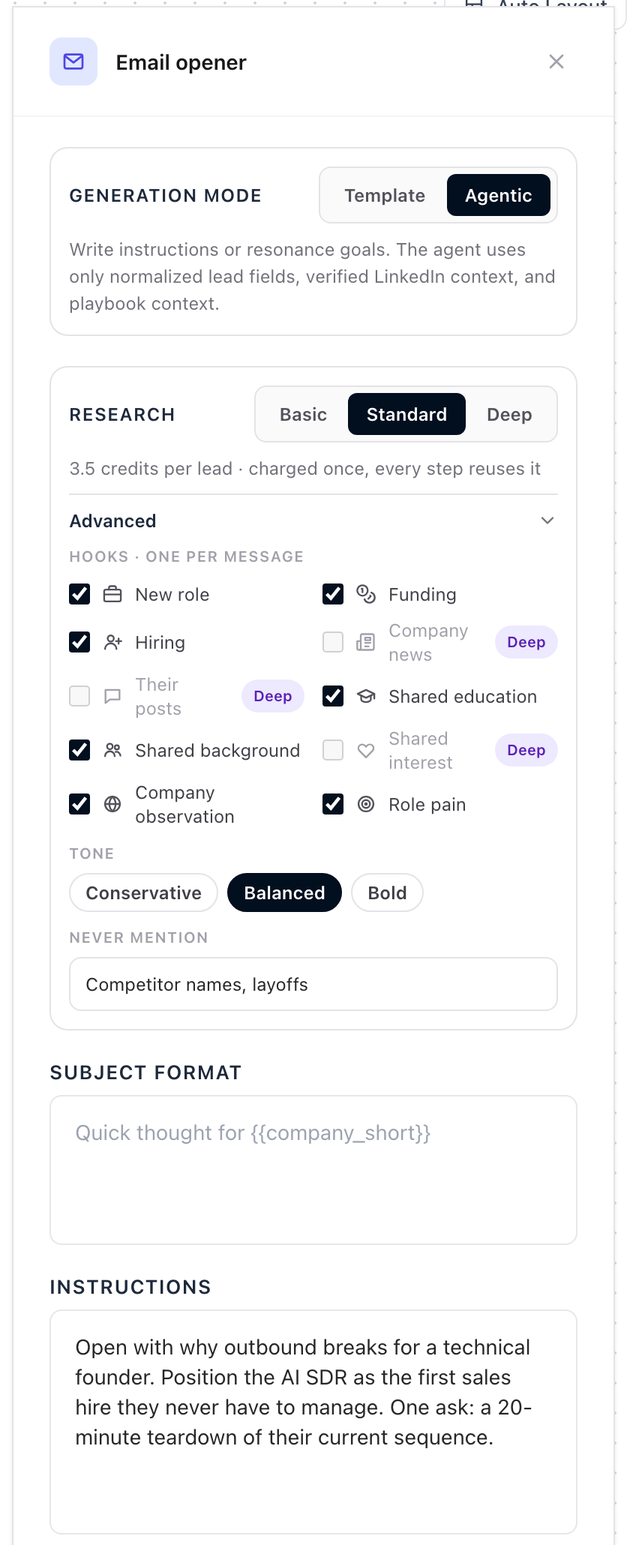
Where to find it
- Open a playbook and go to Outreach Sequence.
- Click an email, LinkedIn message, WhatsApp or Instagram step.
- Set Generation mode to Agentic. A Research row appears under it.
- Click Advanced to open the hooks, tone and Never mention field.
You can also change both on a running campaign. In the live editor the Advanced section is the Personalization link under Research. See Edit a running campaign's sequence.
Research depth
Pick Basic, Standard or Deep. Each step has its own choice.
| Depth | Cost | What Ragworks reads |
|---|---|---|
| Basic | Free | What it already has about the lead: their title, company and profile fields, anything your list or import carried (such as school and work history) and, when the campaign has a connected LinkedIn account, the lead's profile and your own, read through that account. |
| Standard | 3.5 credits per lead | Everything in Basic, plus research on the company: recent funding, open roles and what its website says. |
| Deep | 6 credits per lead | Everything in Standard, plus company news, the lead's own recent posts and interests you share. |
The cost is shown on the step, next to the choice. The price is for the lead, not for the message.
Researched once, used by every step
Ragworks researches a lead once, the first time a step that needs it is about to run. The result is kept, and every later step reuses it, so a four-message sequence costs the same research as a one-message sequence.
- If a later step is set deeper than the research already done, Ragworks adds only the missing part.
- A lead's research is kept for 30 days.
- A lead already researched when you launch (for example, by Preview 3 leads) is not researched or charged again.
What a new step starts at
| The step is | It starts at |
|---|---|
| New, or just switched to Agentic | Standard |
| Already Agentic before research depth existed | Basic |
Nothing that existed before starts costing credits on its own. To research an older step, raise its depth yourself.
Your plan sets the highest depth
| Plan | Highest depth |
|---|---|
| Lite, Starter | Standard |
| Explorer, Scale, Pro | Deep |
On a plan that stops at Standard, Deep is locked and reads Deep · Explorer and above · Upgrade. A campaign never researches deeper than your plan allows.
The campaign's research level
There is no research setting on the campaign itself. Its level is the deepest research any of its steps asks for, and the campaign wizard shows it on the Settings and Review steps. A LinkedIn connection request is not counted: its note is always your template text, so it needs no research.
When the research budget is used
Research draws on the same per-cycle budget as lead sourcing and scoring. When that part of the budget is used, sending carries on, and new leads are researched at Basic until the budget resets. See Lead sourcing budget.
Advanced: hooks, tone and Never mention
A hook is the fact a message opens on. Tick the hooks a step may use. Ragworks picks the best true one for each lead, and a message uses one hook at most.
| Hook | What the message can open on | Needs |
|---|---|---|
| New role | They started their current role in the last 6 months. | Basic |
| Funding | Their company raised funding in the last 90 days. | Standard |
| Hiring | Their company is hiring for a role related to what you offer. | Standard |
| Company news | A recent launch, partnership or acquisition. | Deep |
| Their posts | Something they posted about your topic. | Deep |
| Shared education | The same school, or the same field of study, as you. | Basic |
| Shared background | The same past company or city as you. | Basic |
| Shared interest | The same certification or volunteering organisation, or a topic you both write about. | Deep |
| Company observation | A specific thing on their company website. | Standard |
| Role pain | The pain your playbook's persona describes for their role. | Basic |
"Basic" hooks work when Ragworks has the data for that lead. If it has none, the message falls back to your playbook's value proposition. The three Deep hooks are switched off while a step is set to Standard. If you lower a step from Deep, a ticked Deep hook stays ticked and starts working again when you raise the step back.
Shared education compares the lead's school with yours. For that, add your LinkedIn link to the sender account. See Sender profile.
How hooks are used
- One hook per message. A message never stacks two facts about a person.
- A different hook each step, when there is one. Ragworks remembers the hook an earlier message to the lead used and opens the next one on something else if it can.
- No hook, no problem. If nothing true and relevant is found, or you untick every hook, the message is written from your playbook and the lead's basic details.
- Only what Ragworks found. A hook states a fact Ragworks found, in its own words. It is never built from health, family, politics, religion or similar personal traits. A post hook is phrased around the topic, never as "I saw you liked...".
Tone
Conservative, Balanced or Bold. It sets how boldly the message uses its hook. Balanced is the default.
Never mention
Type topics or words the message must stay away from, for example competitor names or layoffs. The agent is told never to bring them up.
A step with no Advanced settings may use any hook the research depth reaches, in a Balanced tone, with nothing on the never-mention list.
Which depth should I pick?
- Basic for high-volume outreach where a message needs only the lead's role and company, or where a template would do.
- Standard is the right starting point. Funding, hiring and what a company's website says give most messages a real reason to write.
- Deep for small, high-value lists where one very specific opener is worth 6 credits. Test it against Standard before you commit a large list. Experiments can compare them.
Use Preview 3 leads and Simulate to see what each depth writes before you launch.
Where you see what research cost
- On the step, next to the depth choice.
- On the campaign's Review step, before you launch. See Create a campaign.
- On the campaign page, in the Research column of the Leads table.
- In Analytics, on the Lead sourcing tab: research by depth, and reply rate by hook. See Analytics.
- In Credits by category, as its own Research category.