Lead sourcing budget
Each billing cycle, the work that happens before a message is sent (finding, enriching, scoring and researching leads) can use up to 55 % of your credits for the cycle: your plan's credits plus the add-ons you bought that cycle. On the Lite plan it is 45 %. The rest stays free for chat, calls, outreach and everything else your credits pay for.
The budget exists so one large search can't use up the credits your campaigns and agents run on. It is a share of the credits you already have: it adds no charge of its own. In Analytics it is called the pre-send budget.
How big it is
Budget = 55 % × (your plan's credits for the cycle + add-ons bought this cycle), or 45 % on Lite.
The budget is split into two buckets, so one kind of work can't take all of it:
| Bucket | What it pays for | Each bucket can use up to | On Lite |
|---|---|---|---|
| Sourcing & enrichment | Finding leads and filling in their emails, phone numbers and profiles | 40 % | 35 % |
| Scoring & research | Scoring leads against your criteria, and the research behind AI-written messages | 40 % | 35 % |
The two buckets together never go past the budget.
| Plan credits | Add-ons bought this cycle | Pre-send budget | Each bucket up to |
|---|---|---|---|
| 3,000 | 0 | 1,650 | 1,200 |
| 3,000 | 3,000 | 3,300 | 2,400 |
| 15,000 | 0 | 8,250 | 6,000 |
| 1,000 (Lite) | 0 | 450 | 350 |
Buying add-ons raises the budget for that cycle. Add-ons left over from an earlier cycle don't.
What counts against it
Everything that spends credits to find, enrich, score or research leads.
Sourcing & enrichment
- Saving leads with Email or Phone Number turned on
- Enrich leads on a saved list
- Ragworks Database saves
- Instagram searches: the preview holds the most it may use while it runs, and what it did not use goes back
- The enrichment of the leads that pass qualifying a list, including Qualify anyway and Lower the minimum
- Enrichment of profile visitors and of a quickstart campaign
Scoring & research
- The scoring in qualifying a list
- Scoring of profile visitors and of a quickstart campaign
- Lead scoring on a campaign
- Research for AI-written steps: Standard and Deep. Basic is free. See Research depth and hooks
A campaign that needs research holds what it may need from the budget while it runs. The Analytics card shows those credits as Held, and gives back what the campaign did not use.
Chat, phone calls, sending messages, connectors and rentals don't count.
You are charged for what is found or scored, not for what was estimated. The budget works the same way: the estimate is held while the work runs, and what wasn't used goes back.
Where you see it
Wherever you are about to spend credits, the panel tells you what the budget allows.
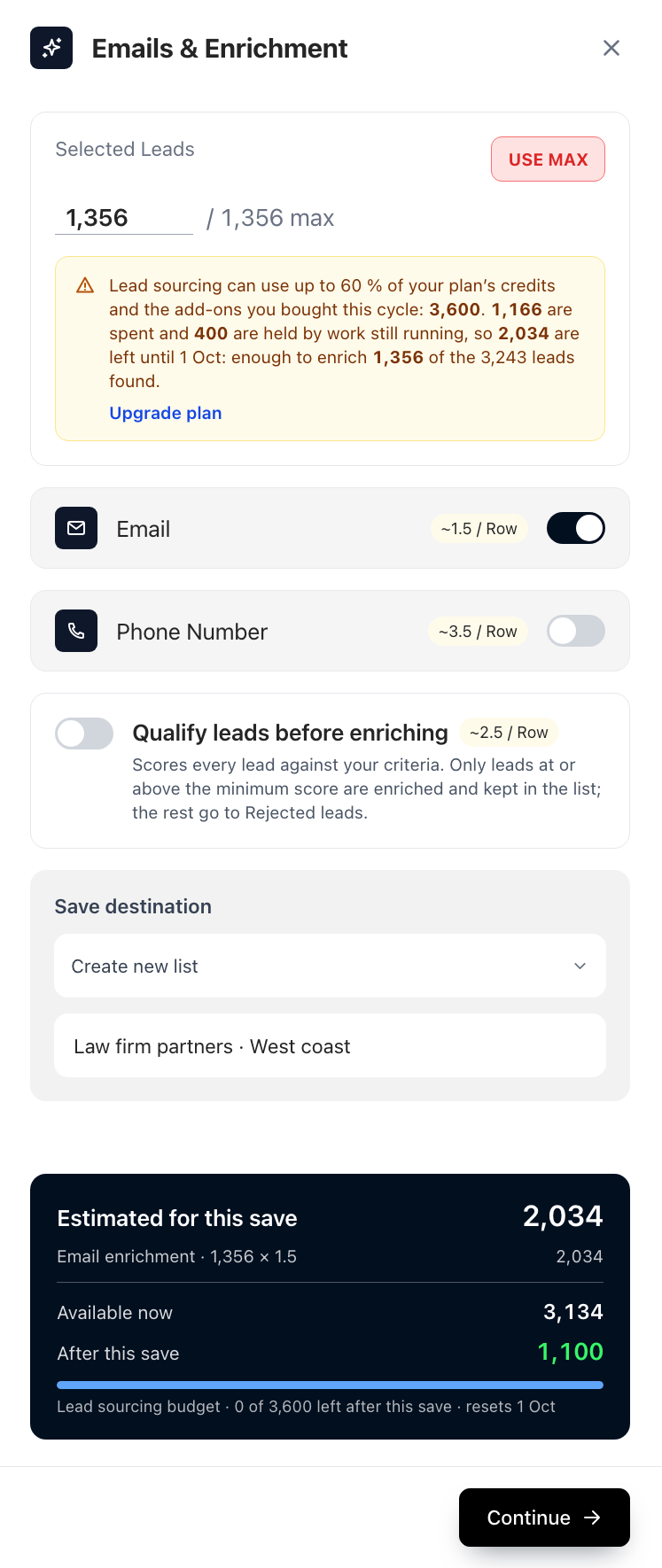
- The maximum next to the lead count is the smallest of the limit per save, the number of leads the search found, and the number the budget still covers at the options you picked. Use max fills it in. The count never goes above it.
- The note says how much of the budget is spent, how much is held by work still running, and how much is left until the cycle resets.
- The estimate card shows what this save will cost, what you have now, and, in the last line, how much of the lead sourcing budget is left after it.
See where the credits went
Analytics shows the budget spent so far on the Overview and Lead sourcing tabs, with the credits each saved list used. On the Lead sourcing tab the Pre-send budget card splits what was spent by lead sourcing, enrichment, qualification and research, shows what is held by running campaigns, and shows the two buckets. How credits are counted lists what each kind of lead work costs.
The budget resets with your credits
The budget follows your credit cycle. On a monthly plan it starts over when your credits renew; on a yearly plan, on the first of each calendar month. Upgrading your plan resets your credits, so it starts a fresh budget as well.
Work counts against the cycle it started in, even if it finishes after the reset.
When the budget is used up
- Saves and enrichment that don't fit are refused before anything is saved. The message says how many leads do fit, so you can lower the count or enrich only emails.
- Qualification pauses with Paused · lead sourcing budget used, shows when it resets, and carries on by itself.
- Profile visitors keep being collected, which is free. Their scoring and enrichment wait for the next cycle.
- Campaigns keep sending. Sending never stops because of the budget. Campaign scoring pauses, and leads that aren't scored yet go out in the order they joined.
- Research drops to Basic. When the Scoring & research bucket is used, new leads are researched at Basic, which is free. The campaign page shows Research budget used with the date it resets. See Research budget used.
Each bucket stops at its own limit, so a full Sourcing & enrichment bucket doesn't stop scoring and research, and the other way round, until the whole pre-send budget is used.
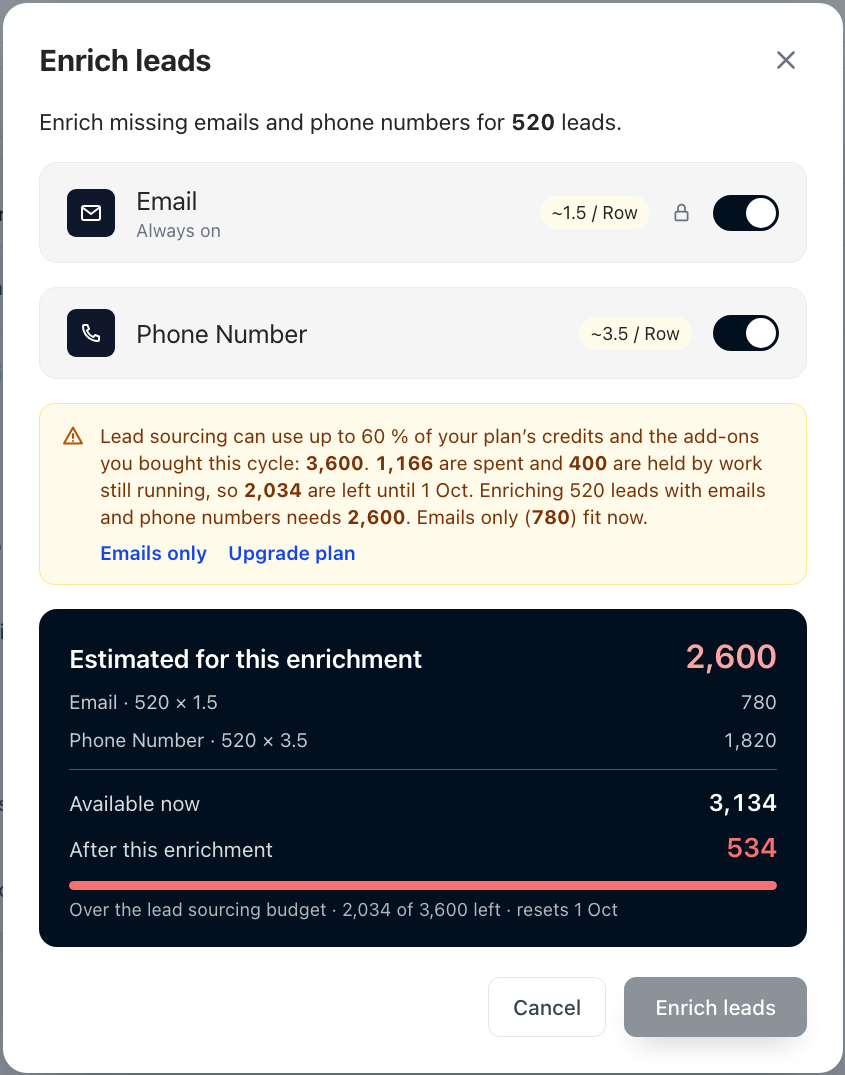
When the estimate is over the budget, the Enrich leads dialog offers Emails only and Upgrade plan. Turning phone numbers off usually brings the estimate back inside what is left.
Good to know
- You need an active subscription. With none, or a cancelled, past-due or incomplete one, new lead sourcing is refused. Work that is already running finishes.
- The first cycle starts from zero. If lead sourcing is turned on in the middle of a cycle, only what you spend from then on counts.
- Custom plans aren't capped until a share is set for your account.