Instagram AI Lead Search
Instagram AI Lead Search helps you find relevant public Instagram profiles using a simple natural-language request.
Use it to build targeted lists of creators, professionals, local businesses, agents, brokers, consultants, and other public Instagram accounts without manually searching profile by profile.
Examples:
Food vloggers in Delhi
Real estate creators in UAE with more than 10k followers
Verified fitness creators in Dubai who post reels
You do not need to connect an Instagram account to use Instagram AI Lead Search. Ragworks searches publicly available Instagram information.
In AI Search, choose Instagram with Change in step 3. It is available when you have an Instagram account connected, or no account at all; with a LinkedIn account connected it is dimmed, because it is another audience rather than a swap for a LinkedIn search.
What You Can Use It For
Common business use cases include:
- creator and influencer discovery;
- local business prospecting;
- real estate agent and broker sourcing;
- partnership and affiliate outreach research;
- agency prospect list building;
- event, hospitality, travel, and food creator discovery;
- building location-specific lead lists;
- finding public business contact details when available.
Instagram AI Lead Search finds and saves leads; the search itself sends nothing. To message them on Instagram, use an Instagram DM step in a sequence, sent from a connected Instagram account.
How to Run a Search
- Open Leads and select AI Search.
- In step 3, Searching in, select Change, choose Instagram, then Use this source. Instagram has no Search profile to read, so the page keeps a search box.
- Describe the people or businesses you want to find in the box under the steps.
- Click AI Search.
- Review the filters Ragworks extracted from your request.
- Review the preview results.
- Adjust any filter and click AI Search again if needed.
- Click Save to List when you are satisfied with the targeting.
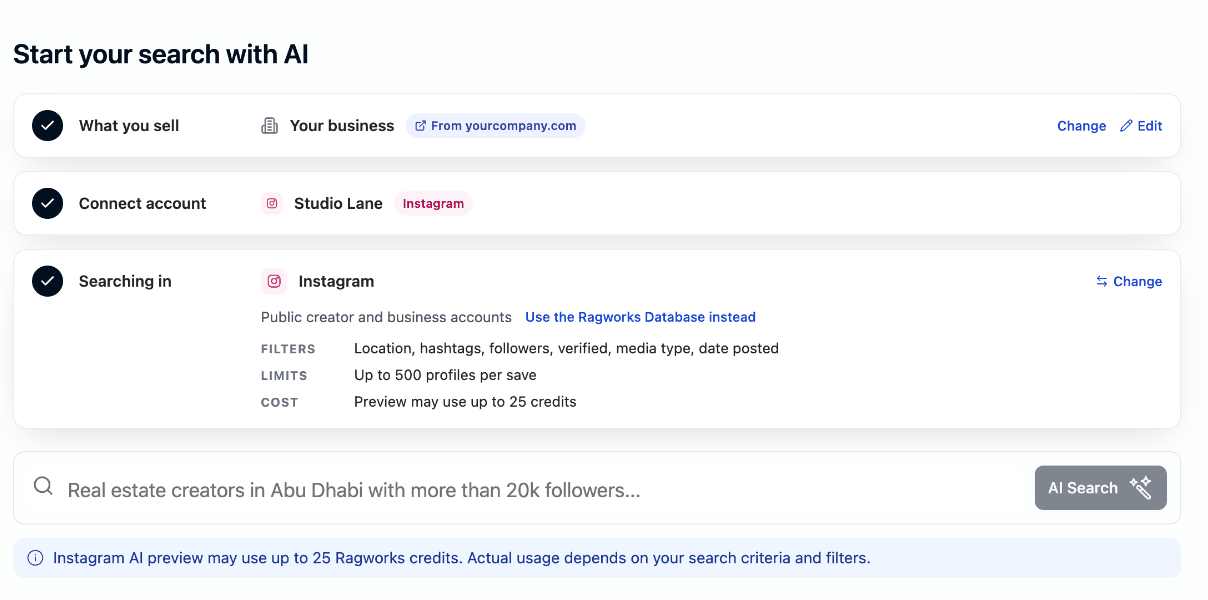
The note under the box says how many credits a preview may use: Instagram AI preview may use up to 25 Ragworks credits.
The first search converts your request into structured Instagram filters. If you manually change or clear a filter afterward, your current filter-panel values are used for the next search.
Writing Effective Search Requests
A strong request normally includes:
- the type of profile you need;
- a city, region, or country;
- an optional follower range;
- an optional verification, reel, or recency requirement.
Recommended examples
| Goal | Example request |
|---|---|
| Local creators | Food vloggers in Delhi |
| Minimum audience size | Food vloggers in Delhi with at least 10k followers |
| Verified profiles | Verified food creators in Dubai |
| Real estate prospects | Real estate brokers in Abu Dhabi with more than 20k followers |
| Reel creators | Fitness creators in Mumbai who post reels |
| Recent hashtag activity | Creators posting #uaefitness reels in the last month |
| Country-wide discovery | Real estate creators in UAE |
Ragworks creates several closely related searches to improve coverage. For example, Food vloggers in Dubai may also look for related terms such as food blogger Dubai and restaurants Dubai.
When a supported country is entered, Ragworks may use its largest relevant cities. For example, a UAE search can include Dubai and Abu Dhabi.
Adding more filters can consume more credits and return fewer profiles. Although essential filters can improve relevance, overly specific searches do not always produce better leads.
Start with a broader request such as Real estate in Dubai, review the preview, and then add only the filters you need.
Instagram Filters
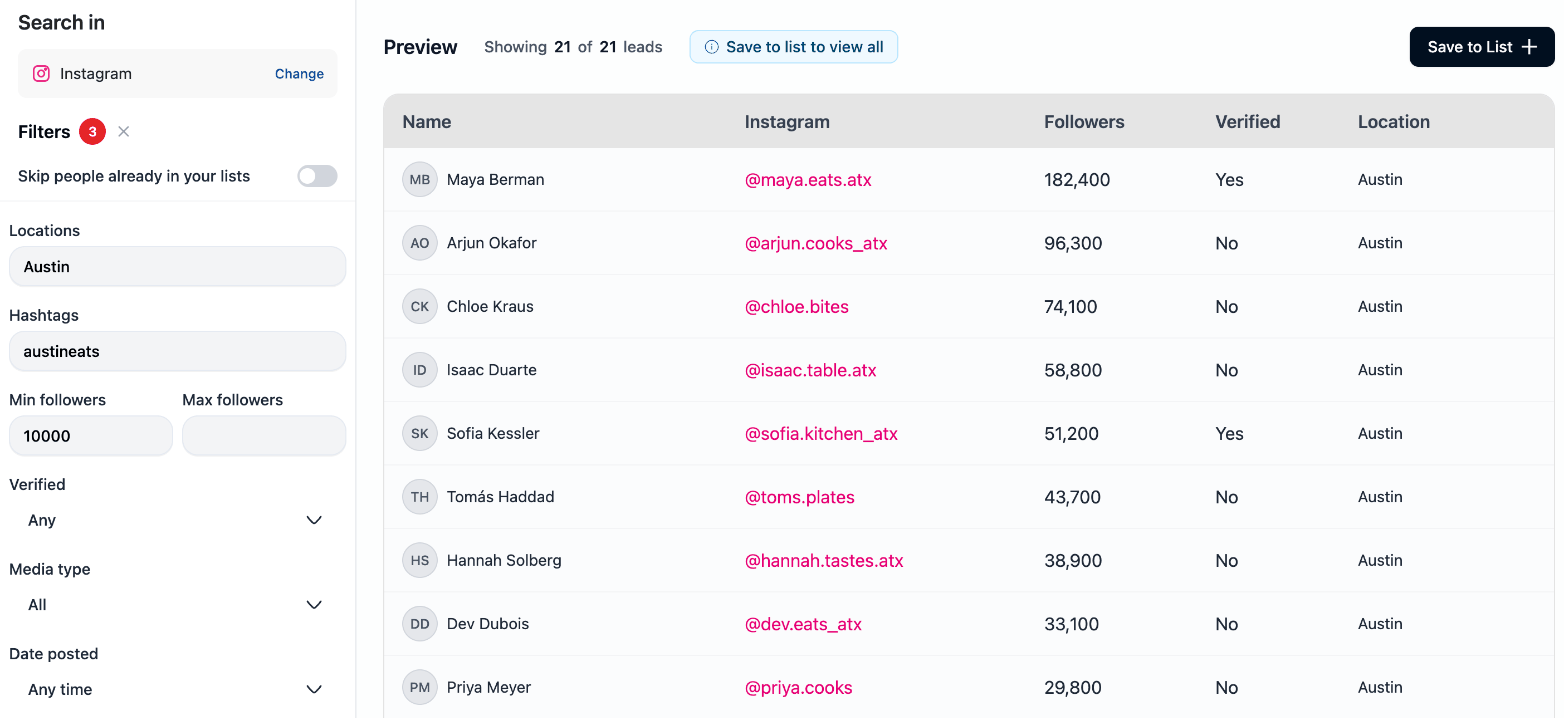
The AI fills filters from your request, and you can edit them before running another search.
| Filter | What it does |
|---|---|
| Locations | Targets one or more cities, regions, or countries. Separate multiple values with commas. |
| Hashtags | Finds public profiles connected to relevant hashtag posts. Separate multiple hashtags with commas and omit #. |
| Min followers | Keeps profiles at or above the entered follower count. |
| Max followers | Keeps profiles at or below the entered follower count. |
| Verified | Choose any profile, verified profiles only, or non-verified profiles only. |
| Media type | Search all supported media or focus on reels. |
| Date posted | Limits hashtag/post discovery to a recent time window. |
Location matching
Instagram does not provide a universal location field for every profile. Ragworks combines the requested location with public signals such as:
- a public business address;
- the biography or display name;
- a public post location or caption;
- city, region, or country references;
- country flags where relevant.
If a profile does not publish reliable location information, Ragworks may use the searched location as a fallback. Treat Instagram location as a targeting signal, not guaranteed physical geolocation.
Followers and verification
Follower count and verification can require an additional public profile lookup. Searches that include these filters may use more credits than broad discovery-only searches.
If a preview row shows a dash for followers, Ragworks found the account during discovery but has not yet needed to retrieve its complete public profile. Complete profile information is collected when required during save.
Hashtags, media type, and date posted
Each hashtag is searched separately. Adding several hashtags can improve coverage, but it can also increase credit usage.
Media type and Date posted are mainly used when discovering accounts through public hashtag/post activity. Date posted refers to the discovered post, not the date the Instagram account was created.
Private accounts
Private Instagram accounts are excluded automatically. They are not offered as a user-controlled filter because Ragworks cannot reliably qualify their private media.
Preview Results
The preview can include:
- profile image and display name;
- Instagram username and public profile link;
- follower count when available;
- verification status;
- matched location.
The default preview limit is up to 50 profiles. The actual number can be lower when:
- your filters are very specific;
- only a small number of public profiles qualify;
- duplicate or private profiles are removed;
- the preview reaches its configured credit cap.
Preview is a real search of public Instagram and may consume credits even if you do not save the results. When it starts, Ragworks sets aside the most it may use (25 credits) from your lead sourcing budget, charges what it really used when it ends, and gives back the rest. Cancel stops it early. If the budget cannot cover that, the search does not start and says so.
Reopening a saved search
From an Instagram list, Actions → Add leads → AI Search reopens the search that built it. Its filters come back as they were saved (locations, hashtags, follower range and the rest), and the page shows one card with AI Search under it instead of the search box.
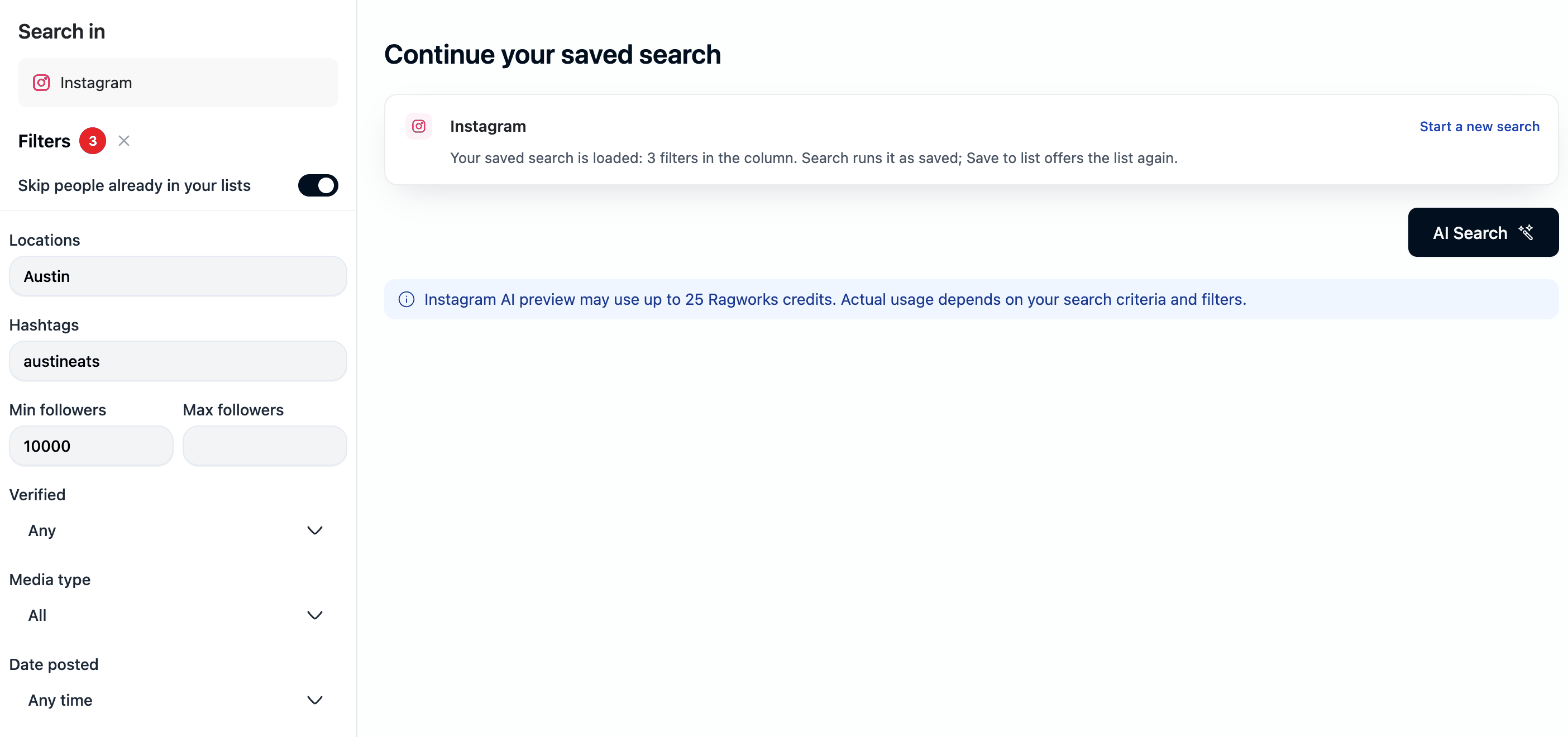
Select AI Search to run the saved filters, and Save to List offers the same list again. The saved filters need at least one hashtag or location to search on: a follower range alone names no one. Select Start a new search to drop the saved search and describe a new one.
Skip People Already in Your Lists
Keep Skip people already in your lists enabled when you want only new prospects.
When enabled, Ragworks removes Instagram profiles already saved anywhere in your workspace before spending credits on their complete profile lookup.
Turn it off only when you intentionally want to see accounts that may already exist in another list. Ragworks still prevents the same Instagram profile from being saved twice in the selected destination list.
Saving Leads
After reviewing the preview:
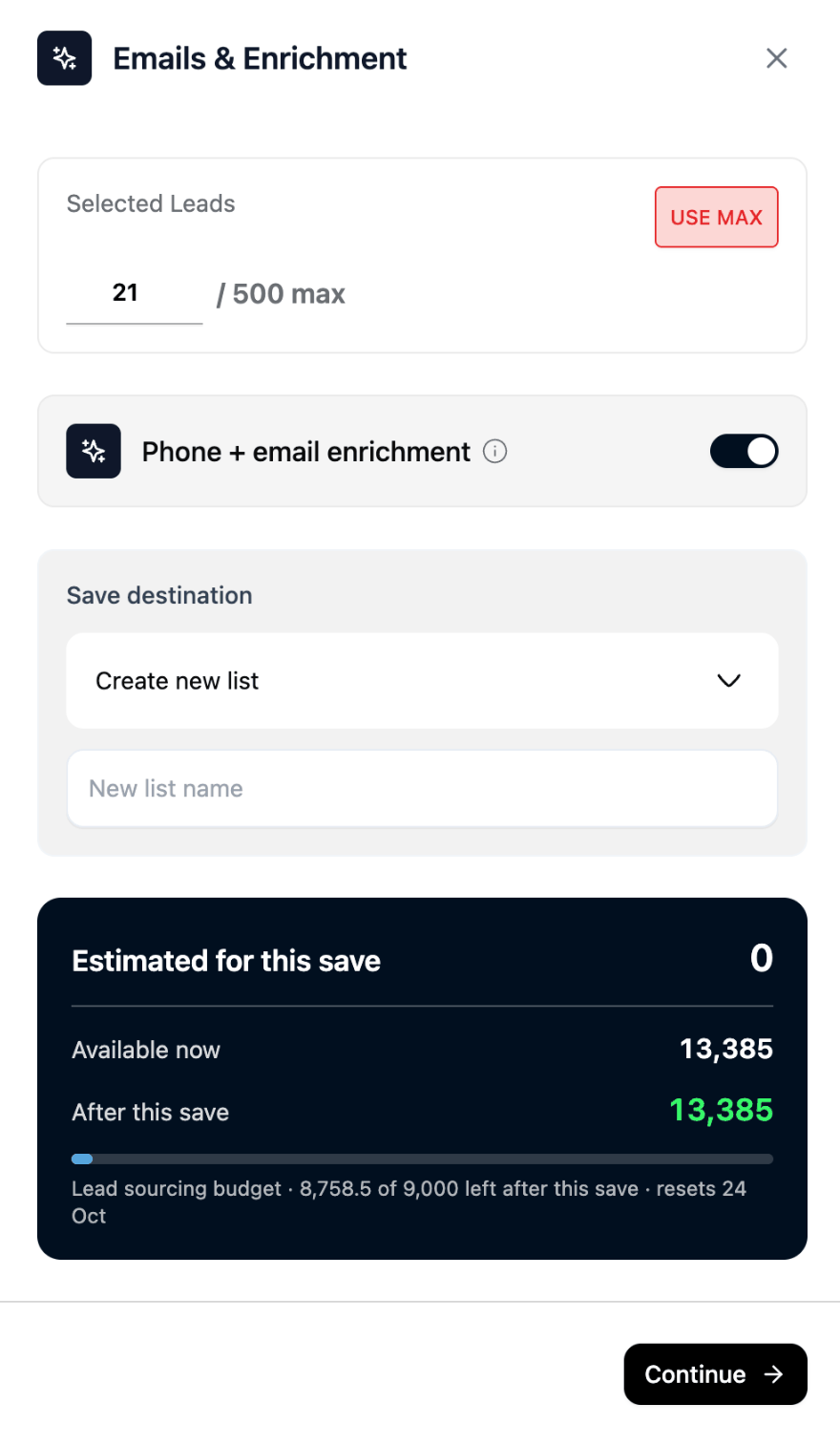
- Click Save to List.
- Enter how many leads you want.
- Choose Create new list or select an existing Instagram list.
- Decide whether to keep Phone + email enrichment on. It starts on.
- Click Continue.
Only Instagram lists are shown as save destinations during an Instagram search.
The maximum lead count is displayed in the save panel, next to the count, and the count starts at the number of profiles in the preview. The full-search maximum is 500 leads. Selecting USE MAX fills in the largest count the panel allows, not only the number currently visible in preview.
The estimate card in the panel does not price Instagram's data-search credits, so it can read 0 for an Instagram save. See Ragworks Credit Usage for what a save can use.
Ragworks first saves reusable preview profiles, then searches for additional qualified profiles until it reaches your requested count or the configured search/credit limit. Duplicate profiles are removed.
You are taken to the saved list immediately. Leads already available appear first while Ragworks continues collecting and enriching the rest in the background.
Phone + Email Enrichment
Enable Phone + email enrichment when you want Ragworks to inspect public profile information for contact details.
Ragworks can use:
- a public Instagram business email;
- a public Instagram business phone number;
- an email explicitly written in the public biography;
- a phone number explicitly written in the public biography.
Public biography details are checked before they are saved. Ragworks does not invent missing contact information.
Email addresses and phone numbers are not guaranteed. Many Instagram profiles do not publish either one.
When both sources are available, an explicit valid contact found in the biography is preferred for the main lead field. The original Instagram business contact remains available in the stored Instagram profile data.
Phone + email enrichment uses AI processing and can consume additional Ragworks AI credits separately from Instagram data-search credits.
Ragworks Credit Usage
- Preview: Up to 50 profiles or 25 Ragworks credits, whichever limit is reached first.
- Save to List: Up to 500 profiles or 500 Ragworks credits, whichever limit is reached first.
How to Reduce Credit Usage
- Start with a preview before requesting a large saved list.
- Use a specific niche and city instead of a broad country-only search.
- Keep Skip people already in your lists enabled.
- Add follower and verified filters only when they are important to your campaign.
- Use only the most relevant hashtags; every hashtag may require a separate request.
- Request a smaller saved-list count first, then add more leads if quality is good.
- Avoid repeatedly running the same unchanged preview.
- Save from the preview you already reviewed so Ragworks can reuse those profiles.
- Keep Phone + email enrichment off when contact details are not required.
Understanding Fewer Results
A search may return fewer leads than requested when:
- very few public profiles match all filters;
- the location cannot be supported by public profile/post evidence;
- accounts are private;
- follower or verified requirements remove candidates;
- matching profiles already exist in your lists;
- provider search or credit limits are reached.
Try removing one restrictive filter at a time. For example, change verified only to any, lower the minimum follower count, or broaden the location.
Saved Instagram Lead Details
Depending on what the public profile provides, a saved Instagram lead can include:
- name and profile image;
- Instagram username and public profile URL;
- biography;
- follower count;
- verification status;
- location;
- business category;
- public email and phone;
- direct public bio links.
Public bio links are saved as their direct destination URL rather than Instagram tracking/redirect links.
Best Practices
- Validate that preview profiles match your ideal customer or partner before saving at scale.
- Use follower count as a targeting signal, not the only measure of profile quality.
- Expect location and contact coverage to vary because Instagram profiles control what they publish.
- Keep searches focused enough to be relevant but not so restrictive that only one profile can qualify.
- Review saved leads before adding them to an outbound campaign.
- Use public contact information responsibly and follow applicable privacy, marketing, and anti-spam laws.
Current Limitations
- Search uses public Instagram information only.
- Private accounts are excluded.
- Location is inferred from public evidence and may not be exact.
- Public email and phone availability is not guaranteed.
- The search does not send direct messages. Instagram DMs go out from a campaign's sequence, with a connected Instagram account.
- Search results depend on information currently available from Instagram and its public surfaces.