AI Sales Strategist Report
The AI Sales Strategist report is a plain-language assessment of a single campaign — what's working, what isn't, and what to change. It reads the campaign's own sequence copy, a sample of real replies, response timing, and how well the contacted leads fit your target, then writes a scored diagnosis and a prioritised list of edits.
It lives on the campaign page's Strategist tab and is also downloadable as a multi-page PDF.
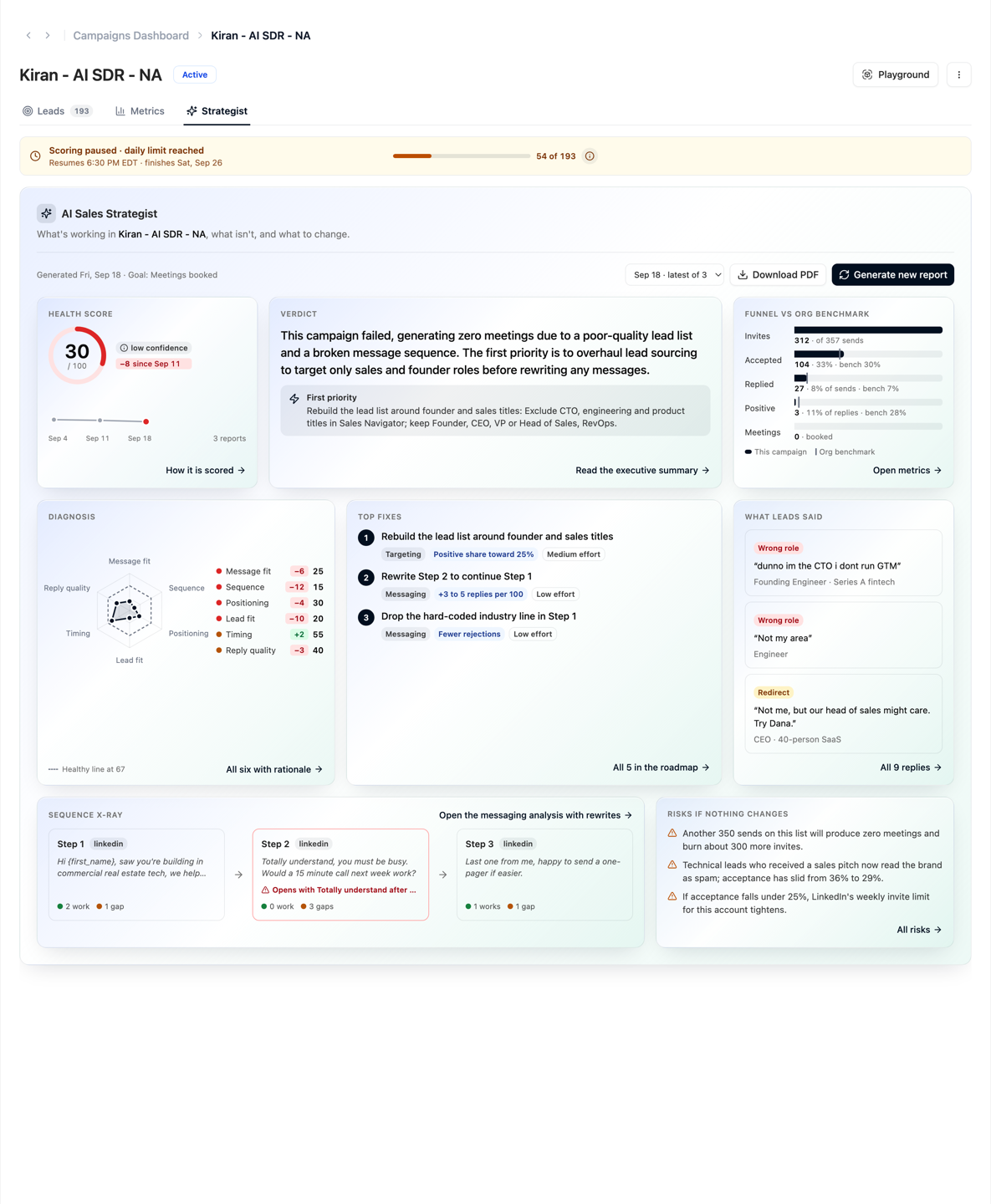
Opening the report
- Click Home in the left sidebar.
- Click the Campaigns tab and click the campaign.
- Choose the Strategist tab.
You can also go straight to /campaigns/<id>?tab=strategist. The tab is available on Active, Paused and Completed campaigns; a Pending campaign has nothing to assess yet, so the tab is not shown.
A dot on the tab means a report has landed since you last opened it.
Before the first report
Until a report exists, the tab shows what you will get and whether the campaign is ready. Each line is checked before you click, so you never spend a generation to find out.
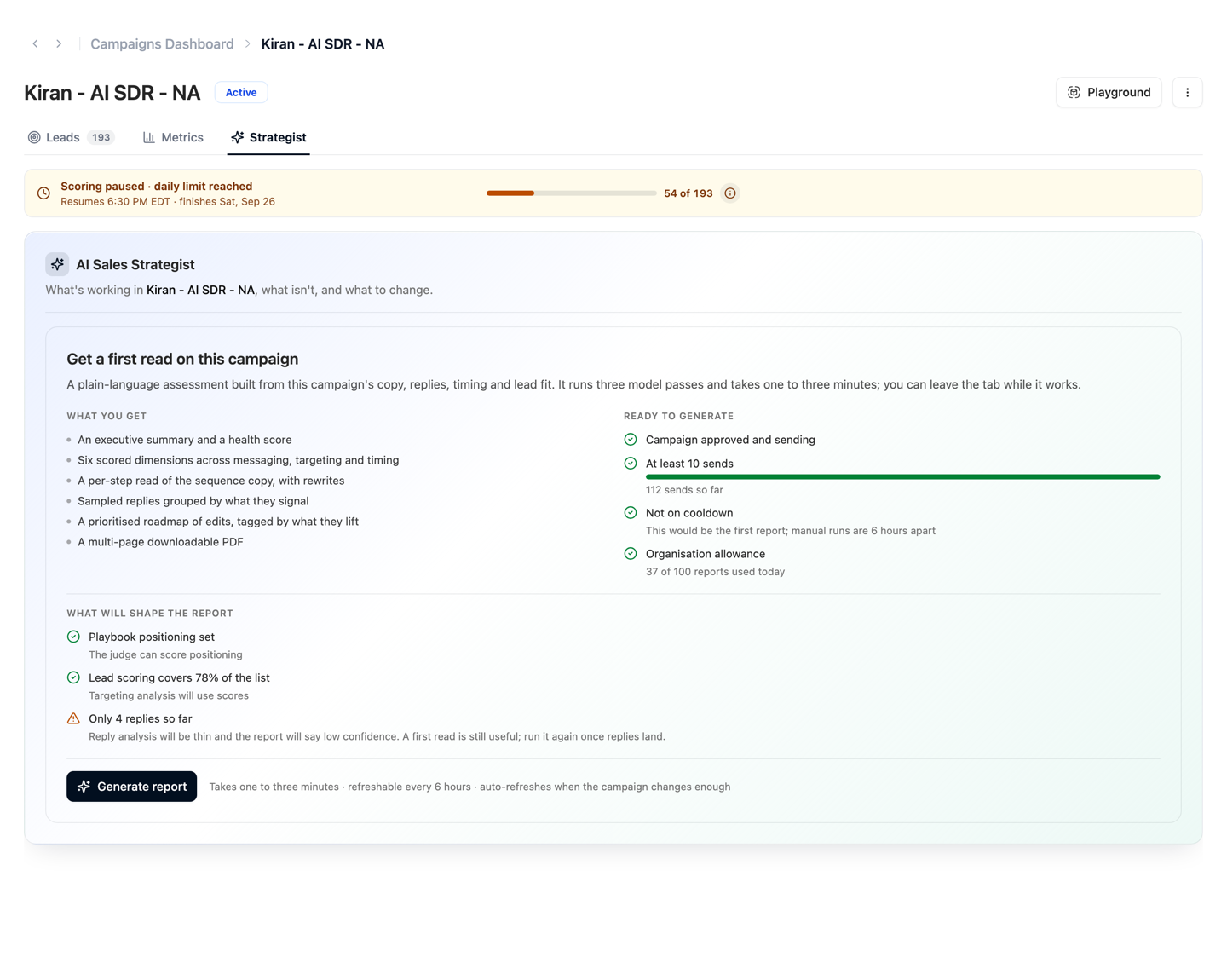
Ready to generate — the four gates:
| Gate | Rule |
|---|---|
| Campaign approved and sending | A campaign that has not sent anything has nothing to read. |
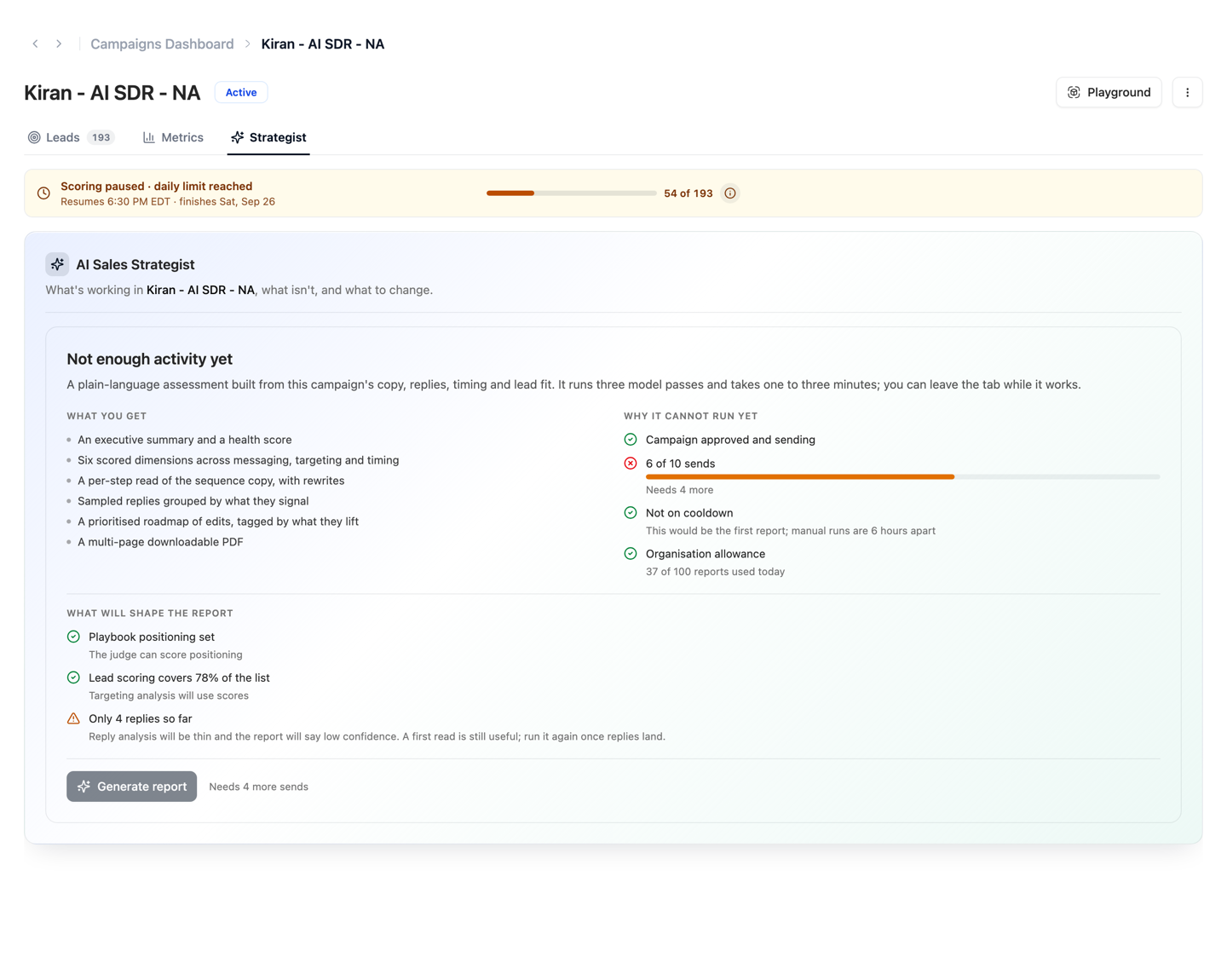
| At least 10 sends | Below that, generation is refused. The bar shows how far along you are. |
| Not on cooldown | One report per campaign every 6 hours. |
| Organisation allowance | Each organisation has a per-day limit across all campaigns. |
What will shape the report — advisories that do not block generation but tell you how good it will be: whether the playbook has positioning set, how much of the list lead scoring has covered, and how many replies there are to read. A campaign with only a few replies produces a thin, low confidence report; a first read is still useful, and you can run it again once replies land.
When a gate blocks, the same card says why and the button explains what is missing.
Generating
Click Generate report. The report is built in three model passes and usually takes one to three minutes. You can leave the tab; it keeps running in the background. A report that fails partway can be retried immediately — the cooldown only starts on a successful run.
Generating a new report
The report does not update by itself. To see whether your changes helped, generate a new one 6 hours after the last:
- Open the campaign's Strategist tab.
- Click Generate new report above the overview.
Until 6 hours have passed, the button reads Generate again in … with a countdown, and it cannot be clicked. The new report is added to the version picker next to your earlier ones, and its change chips show what moved since the last.
Campaign goal
A campaign can carry an optional goal, chosen when you create it (on the Finalize Settings step, or in the goal step of the quick-start flow). It's a category, not a target — there are no numbers to set. The report is scored and written against this goal, so a network-building campaign isn't marked down for booking few meetings.
| Goal | What the report treats as success |
|---|---|
| Meetings booked | Booked calls. Replies and connections only matter as steps toward a meeting. |
| Profile growth | A warm, growing network: connection acceptance, ongoing conversation, relationship signals. A low meeting count is fine. |
| Market research | Useful feedback: positive replies, detailed responses, and clear objections. Meetings are not the point. |
The goal is shown under Goal in Campaign details and on each report. If no goal is set, the report reads intent from the playbook's objectives, or from the sequence CTA when there is no playbook.
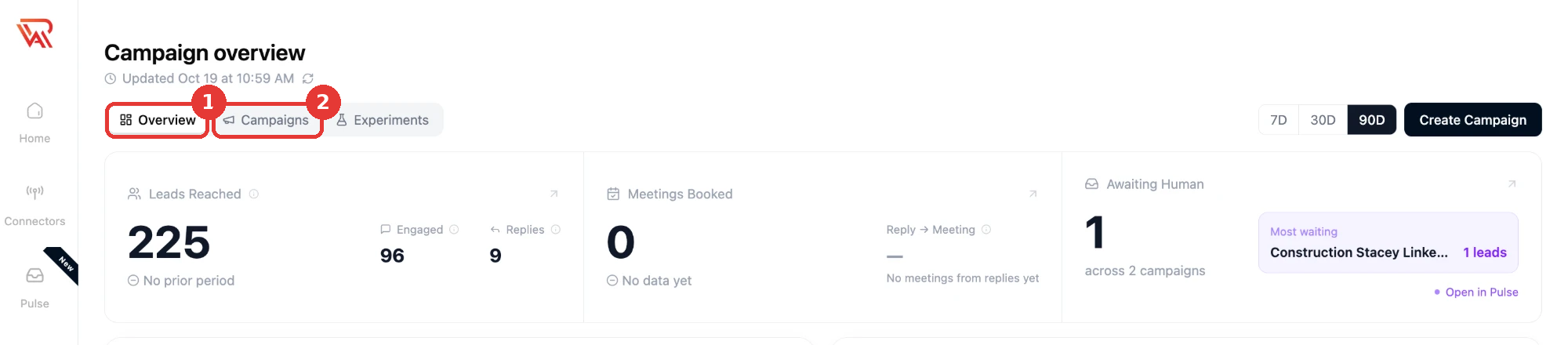
The overview
The tab opens on a one-screen overview. Every tile is built from the report itself, and each one opens the section it summarises.
| Tile | What it shows | Opens |
|---|---|---|
| Health score | The 0–100 score with its confidence, the change since the previous report, and a sparkline of past scores | Diagnosis |
| Verdict | The one-glance TL;DR and the first priority from the roadmap | Executive summary |
| Funnel vs org benchmark | Invites → accepted → replied → positive → meetings, with a tick where your organisation's benchmark would put each stage | The Metrics tab |
| Diagnosis | The six dimensions as a radar against the healthy line at 67, with the numbers beside it | Diagnosis |
| Top fixes | The three highest-ranked roadmap items with their lift tag, expected lift and effort | Roadmap |
| What leads said | The first few sampled replies with what they signal | Replies |
| Sequence x-ray | Each step with what works and what is missing; the weakest step is flagged | Messaging analysis |
| Risks | What happens if nothing changes | Risks |
Above the tiles: when the report was generated and which goal it was scored against, a version picker when more than one report exists, Download PDF and Generate new report.
Health score and confidence
| Element | Meaning |
|---|---|
| Health score (0–100) | A single deterministic score for the campaign, coloured red / amber / green. It is computed from the funnel metrics against a benchmark, not written by the model. |
| Confidence (low / medium / high) | How much sampled evidence backs the assessment. Driven mainly by how many replies and sends were available. |
| Change chip | The difference against the previous report, so you can tell whether your last change helped. |
If the report is more than two weeks old, a banner suggests generating a fresh one.
Sections
Every link from the overview opens the same reading view: a section index on the left, the section in the middle, and a rail on the right with the dimensions and roadmap items that belong to it.
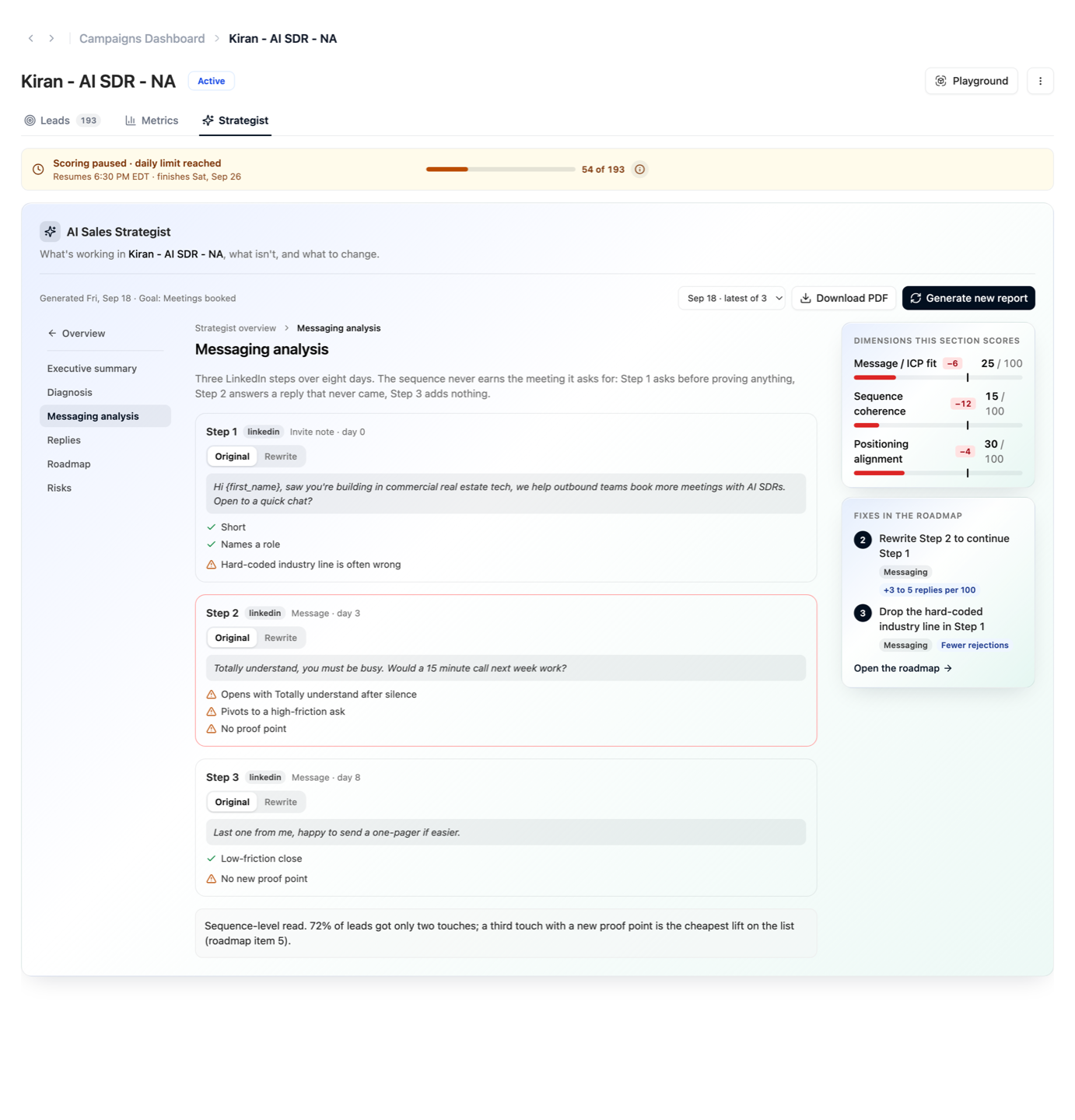
Diagnosis — six scored dimensions
Each dimension is scored 0–100 with a short rationale that cites specifics from your campaign, and a chip with the change since the previous report.
| Dimension | What it looks at |
|---|---|
| Message / ICP fit | Does the opener and value proposition match the target persona and their pain? |
| Sequence coherence | Do the steps build on each other and escalate the ask, or repeat themselves? |
| Positioning alignment | Is the copy consistent with your playbook's positioning and ICP? |
| Target-lead fit | Are the contacted leads actually in the segment the copy was written for? |
| Response-timing fit | Are sends landing in the windows where this audience actually replies? |
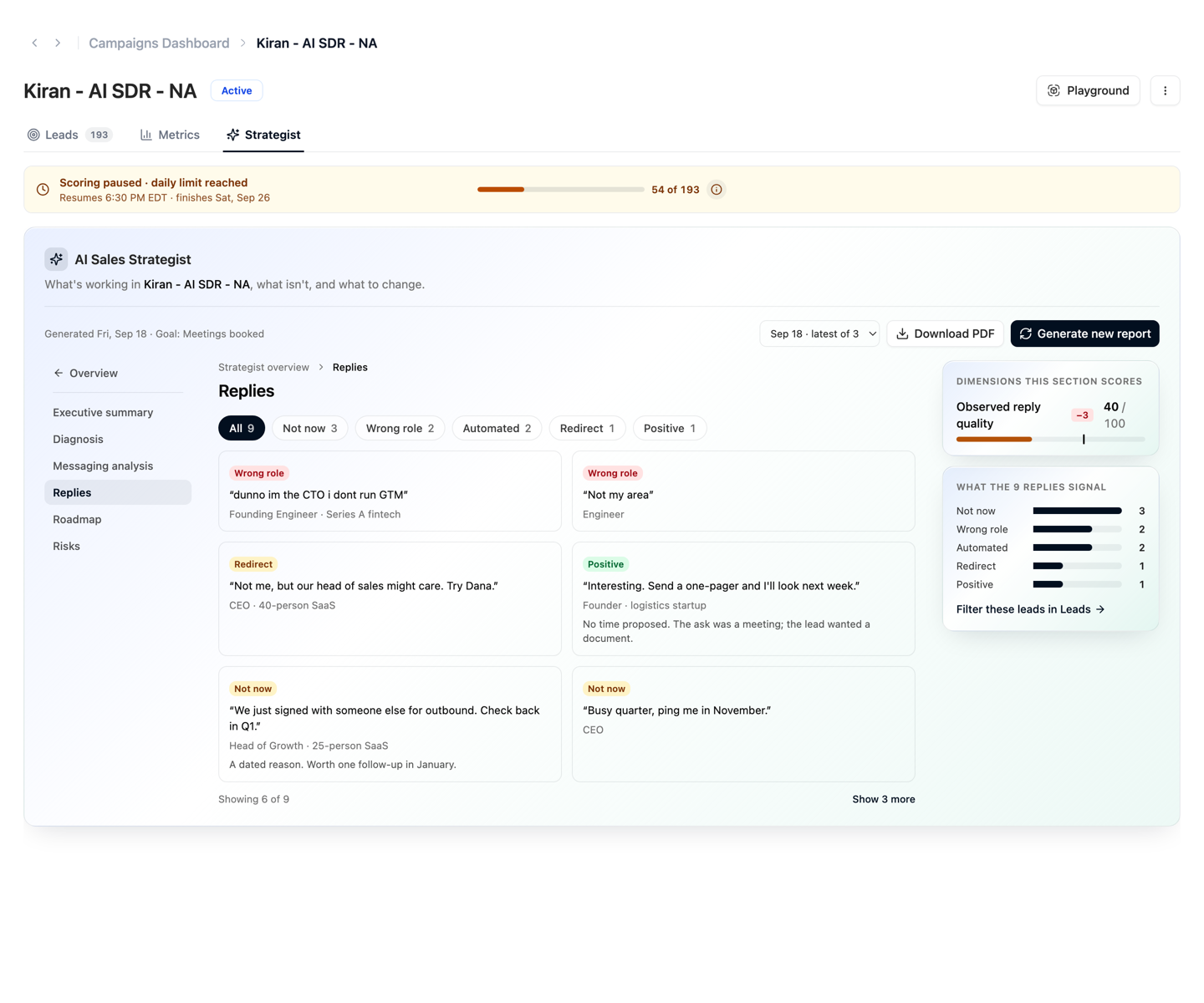
| Observed reply quality | What do the sampled replies signal — real intent, soft deferrals, wrong person? |
Messaging analysis
A per-step read of the sequence. Each step shows the message copy, what's working, the gaps, and a Rewrite you can paste in — switch between Original and Rewrite on the step.
Replies
Sampled replies grouped by what they signal (for example wrong role, not now, positive), quoted as the lead wrote them. Use the chips to filter by category; the rail counts each signal and can open those leads in the Leads tab.
Non-responders, Timing and Targeting
What the silent leads have in common, where replies cluster by day and hour with the recommended send windows, and how well the contacted list matches the intended persona.
Roadmap
A ranked list of changes to make. Each item has the specific edit, the evidence behind it, the expected lift, the effort (low / medium / high), the metric it is meant to move, and a lift tag — Messaging, Reach, Throughput, Targeting, Timing or Confidence.
Risks
The concrete downside of leaving the campaign as-is.
Past reports
When more than one report exists, the version picker above the overview lets you open any past run. The health tile's sparkline and the change chips are always relative to the reports before the one you are viewing, so opening an older report never shows a newer one.
Downloading the PDF
Download PDF produces a multi-page report with the score, charts, the full diagnosis, per-step messaging analysis, the roadmap, and the risks — suitable for sharing with your team.
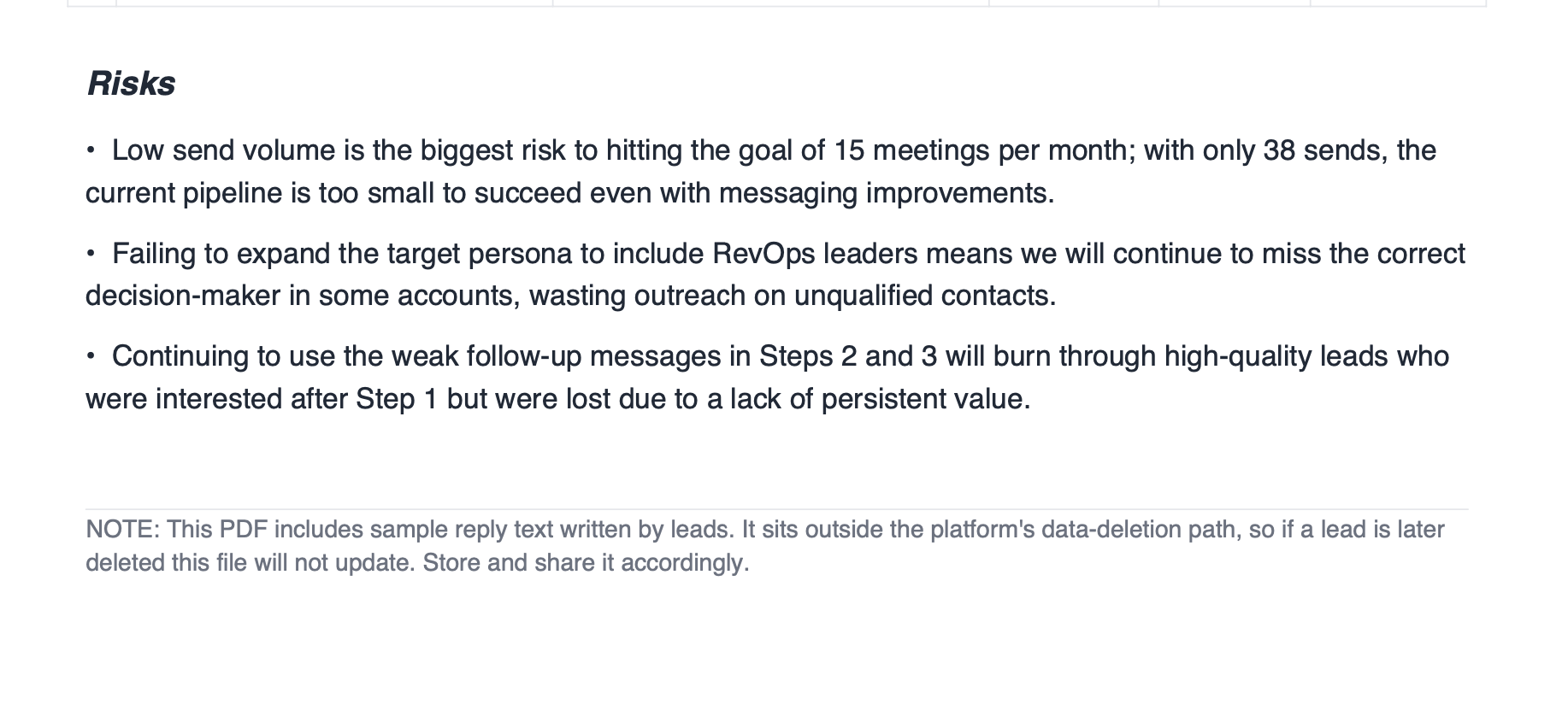
The PDF includes sample reply text written by leads. It is a point-in-time export and sits outside the platform's data-deletion path — if a lead is later deleted, an already-downloaded PDF will not update. Store and share it accordingly.
What the report is not
- It does not change your campaign. Every recommendation is something you choose to apply (or not) in the Sequence and campaign settings.
- It is a snapshot of the moment it was generated. Generate a new one after you make changes to see if they helped.
- It is not a substitute for your own judgement about your market — treat the audience-side findings as prompts to investigate.