Signal credits
Signals are paid for with signal credits: a balance of their own, bought in advance and spent on one thing only, the leads your signals qualify. Nothing else on the platform draws on it, and signals never draw on anything else. This page covers what they cost, how to buy them, how to cap what a signal spends, and what happens when they run out.
The price
- Ten signal credits are one dollar.
- One qualified lead is ten credits. That's one dollar per person who cleared a list's bar and was added to it, with a work email where one could be found.
- A person who qualifies for two lists from the same signal costs ten credits for each list.
- A person is never scored, and so never charged, twice for the same list within 30 days, whichever signal finds them.
Everything else is free: reading, leaving people out, the title check, scoring, and the email lookup. The dashboard marks each stage Free so there's no doubt which step costs.
Signal credits are separate from the credits your plan includes. Buying signal credits doesn't change your plan, and your plan's credits are never used for signals. The one thing they share is the card on your account.
Buying credits
Signals → Billing is where you buy credits and see where they went. The dashboard, the setup form and the low-balance notice all link to it with Buy signal credits or Buy credits.
Your balance and the price
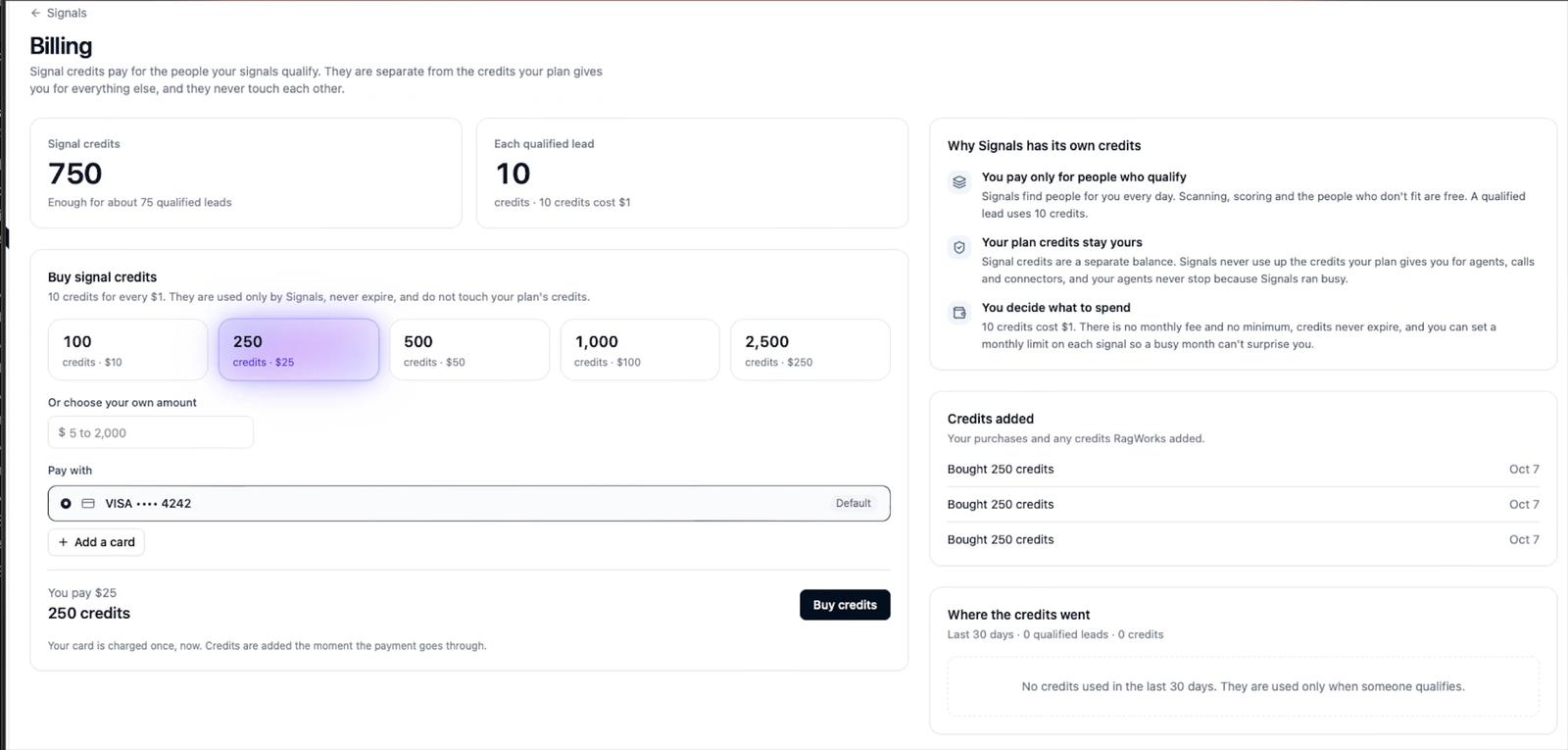
Two cards sit at the top. Signal credits is your balance, with a plain estimate of what it buys (750 credits: enough for about 75 qualified leads). Each qualified lead restates the price: 10 credits, and 10 credits cost $1.
Buying a pack
In Buy signal credits, pick one of five packs, or type your own amount:
| Pack | Price |
|---|---|
| 100 credits | $10 |
| 250 credits | $25 |
| 500 credits | $50 |
| 1,000 credits | $100 |
| 2,500 credits | $250 |
Or choose your own amount takes any whole number of dollars from $5 to $2,000, and gives you ten credits for each. The picked pack lights up, and nothing is charged until you click Buy credits.
Under Pay with, choose the saved card to pay with (your default is selected for you), or Add a card. The summary at the bottom says what you are about to do: You pay $25, 250 credits, with a reminder that your card is charged once, now, and the credits are added the moment the payment goes through. They appear in the balance straight away, with no waiting for the next run.
There's no subscription, no monthly fee, no minimum and no expiry. Credits sit in the balance until a signal uses them.
If there's no card on the account yet, the page asks you to add one first.
What's on the right
Three panels sit beside the purchase, and they answer the questions people usually have before they buy:
- Why Signals has its own credits. In short: you pay only for people who qualify; your plan's credits stay yours, because Signals never uses up the credits your plan gives you for agents, calls and connectors (and your agents never stop because Signals ran busy); and you decide what to spend, with a monthly limit you can set on each signal.
- Credits added. Your purchases, newest first, and any credits Ragworks added to your balance, each with its date. It's the record to check when you want to match a charge on your card statement to the credits you received.
- Where the credits went. The last 30 days: how many qualified leads, how many credits they used, and which signals used them. When nothing has qualified it says so (No credits used in the last 30 days. They're used only when someone qualifies), which is the quickest reassurance that an idle signal isn't costing you anything.
Limits
Per signal
Each signal can have a monthly limit, set when you create it and changeable at any time from its page. It's the most that signal may spend in a calendar month. When it's reached, the signal pauses with Paused: your monthly spend limit was reached and starts again on the first of the next month, or as soon as you raise the limit.
A limit is optional. Without one, the signal's only stop is your balance.
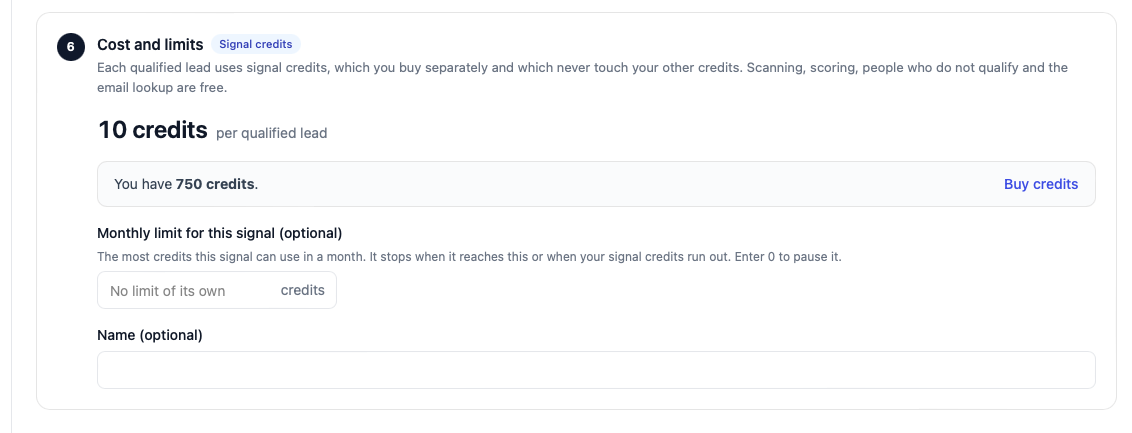
Set a limit on a new signal for its first month. Once you've seen its yield, raise it or take it off. A signal that qualifies plenty of the wrong people is cheap to stop this way, and it's quicker than editing the titles.
Lowering a limit
Lowering a limit below what the signal has already spent this month stops it at once. Nothing is refunded: the people it already qualified stay on your list.
No account-wide limit
There is no overall cap by default. The balance is the stop: when it's empty, every signal pauses. If you want a hard monthly ceiling across all signals, buy that amount of credits and no more.
When you run out
A signal that qualifies someone it can't pay for pauses with Paused: you're out of signal credits. Buy more to carry on. The person who couldn't be paid for isn't lost: the next run after you top up finds them again, if they still fit.
Until then nothing is read, so a paused signal uses no requests on your LinkedIn account either.
When a charge can't be checked
Very occasionally the billing service can't confirm your balance during a run. The signal then pauses with Paused: we couldn't check your signal credits. We'll try again and tries again on the next run. Nothing is charged for a run that couldn't be confirmed.
Refunds
Credits are spent on a lead at the moment it's added to your list. They aren't refunded if you later remove the lead, and a lead you remove doesn't come back and get charged again on the next run.