Sequence
A sequence is the route every lead takes through your outreach: which steps run, on which channel, how long to wait between them, and where each lead goes next depending on what happened. You build it once and attach it to any number of playbooks.
A sequence decides the when and the how. The playbook decides the what: the messages each step sends and how replies are answered.
| Sequence | Playbook | |
|---|---|---|
| Defines | Steps, channels, waits and branches | Messages, personas, response guidelines |
| Reuse | One sequence can serve many playbooks | One playbook per campaign type |
| Before it can be used | A published version | Published, with a message for every step |
Sequence  →  Playbook  →  Campaign
(steps)      (messages)   (leads, accounts, schedule)
You need a published sequence before a playbook can use it. The predefined templates are published already, so you can start with one straight away.
Steps
Drag steps from the Add Sequences panel onto the canvas.
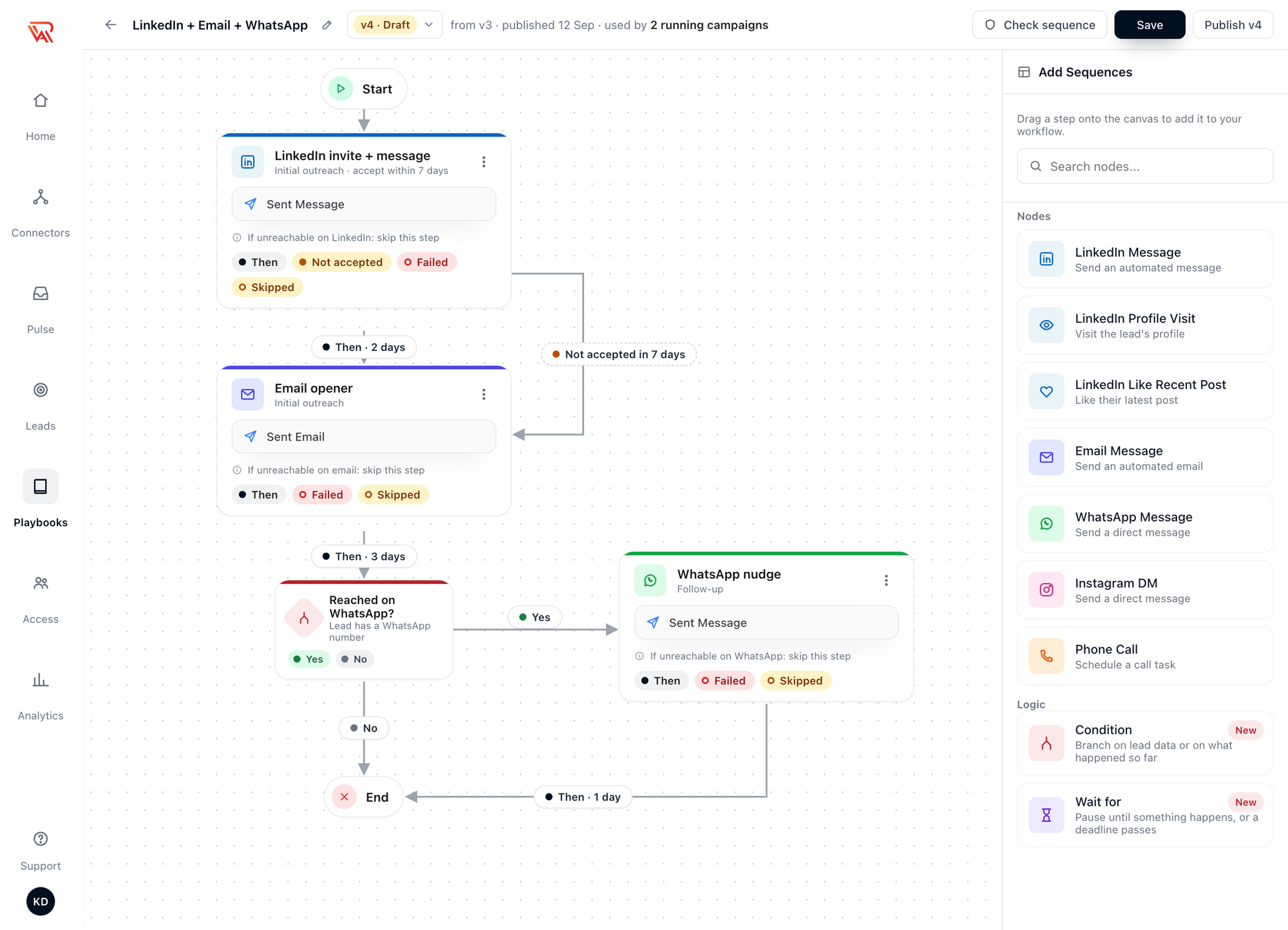
Channel steps
| Step | What it does | The lead needs |
|---|---|---|
| Connection request | Sends a connection request, with a note if you write one, and stops there. Pair it with a Wait for and a follow-up message | A LinkedIn profile ID |
| LinkedIn Message | As Initial outreach: a connection request with a note, then a message once it is accepted. As Follow-up: a message to a connection | A LinkedIn profile ID |
| LinkedIn Profile Visit | Visits the lead's profile | A LinkedIn profile ID |
| LinkedIn Like Recent Post | Likes their latest post | A LinkedIn profile ID |
| Email Message | An email from your connected mailbox. Initial outreach opens a thread, Follow-up replies in it | A valid email address |
| WhatsApp Message | A WhatsApp message from your connected WhatsApp account | A phone number |
| Instagram DM | A direct message from your connected Instagram account | An Instagram handle |
| Phone Call | A call placed by your AI voice agent | A phone number in international format |
A campaign also needs a connected account for every channel its sequence sends on.
Profile visits and likes warm the lead up and never stop a sequence: if one cannot run, the lead simply moves on.
Connection request is rolling out to organizations gradually. If it isn't in your Add Sequences panel yet, use the single LinkedIn Message step described below.
Two ways to open on LinkedIn
| One step | Two steps | |
|---|---|---|
| Built from | LinkedIn Message with the Initial outreach role | Connection request, then a Wait for connection, then LinkedIn Message with the Follow-up role |
| What happens | The invite goes out. Once the lead accepts, the message follows straight away | The invite goes out. The message follows only after the lead accepts and the delay you set on the Happened line has passed |
| Not accepted | The acceptance window ends and the lead takes Not accepted | The Wait for's deadline passes and the lead takes Timed out |
| Use it when | You want the message to follow the acceptance as soon as it happens | You don't want an invite and a message to land on the same day |
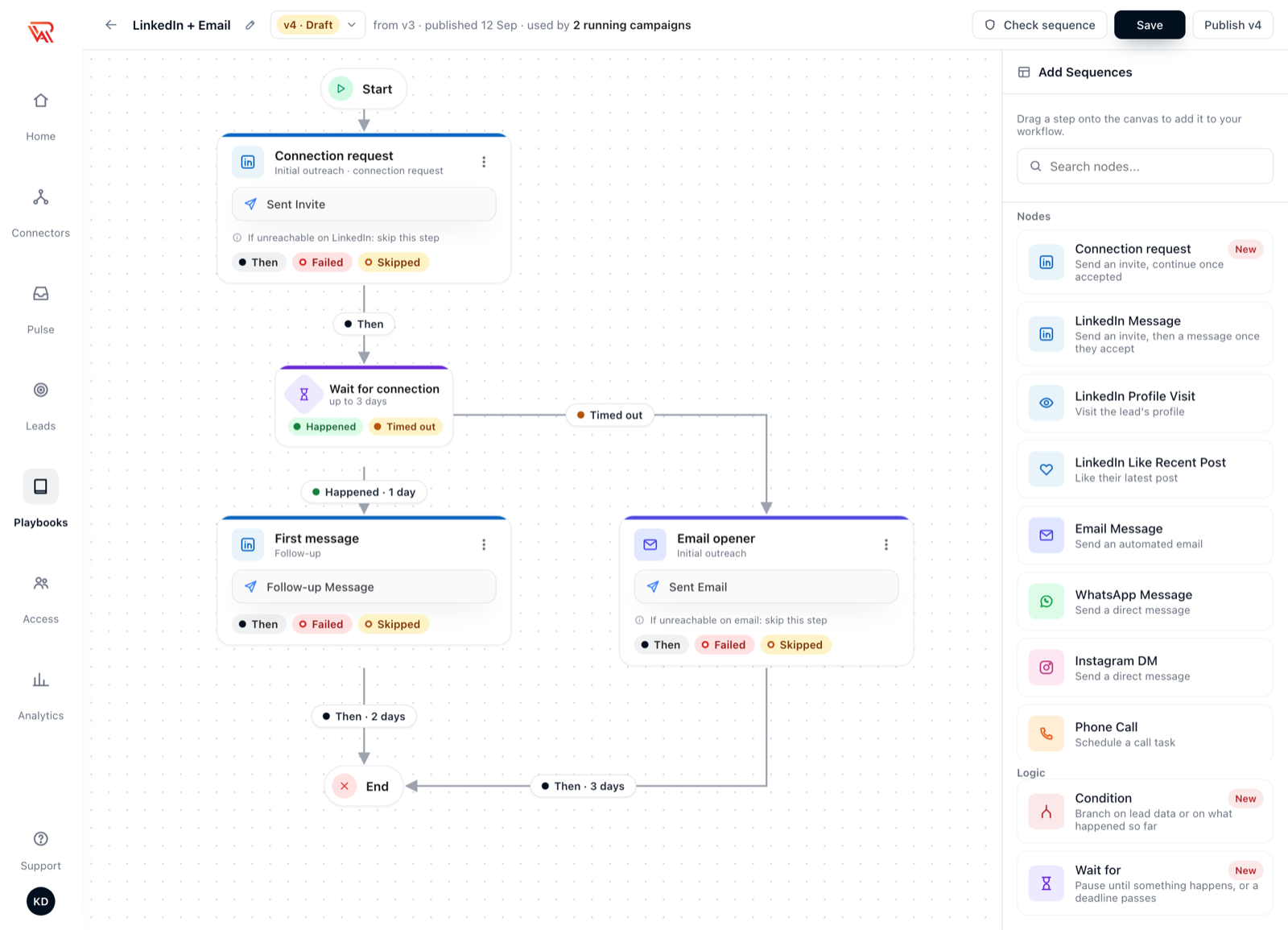
A lead who is already connected skips the invite in both. In the two-step version the lead passes the Wait for at once and the message follows after the delay.
Use one shape per sequence. Check sequence refuses a sequence that has a Connection request and also a LinkedIn Message with the Initial outreach role, because both send an invite and the lead would be invited twice.
Logic steps
| Step | What it does |
|---|---|
| Condition | Sends the lead down Yes or No, depending on the lead's data or on what happened so far. See Conditions and waits |
| Wait for | Pauses until something happens (a connection accepted, a message read, an email opened) or a deadline passes. See Conditions and waits |
Outcome ports
Every step ends in one of a few outcomes, and each outcome is a port: a small chip under the step that you connect to the step that should come next. That is how one sequence treats leads differently.
| Port | When a lead takes it | If you leave it unconnected |
|---|---|---|
| Then | The step went out | Always required |
| Failed | The step was tried and could not go out: an invite LinkedIn refused, a bounced email, a number not on WhatsApp | The lead stops |
| Skipped | The lead can't be reached on this step's channel, so the step was not tried | The lead continues on Then, without Then's wait |
| Not accepted | LinkedIn Message with the Initial outreach role only: the invite was still pending when the acceptance window ended | The lead continues on Then, without Then's wait |
| Replied to invite | LinkedIn Message with the Initial outreach role only: the lead answered the note on your invite | The lead continues on Then, without Then's wait |
| Answered · Voicemail · No answer | Phone Call steps: how the call ended | Answered and Voicemail continue on Then; No answer is treated as Failed |
| Yes · No | Condition steps | Both are required |
| Happened · Timed out | Wait for steps | Both are required |
The line between two steps carries the port and the wait, for example Then · 2 days, Failed · same day or Not accepted in 3 days. Then, Yes, No, Happened and Timed out are drawn as solid lines; the other ports are dashed side routes.
When a lead replies, the AI agent answers them and the sequence stops for that lead, as it always has. Two exceptions: an answer to the note on your connection request (see Replies to your connection request), and automated replies such as out-of-office messages, which are labelled but don't end the sequence.
Leads who can't be reached on a channel
Most lists are uneven: some leads have an email and no LinkedIn profile, some the reverse. Each channel step has a rule for them:
| Rule | What happens |
|---|---|
| Skip this step (recommended, the default) | The step is skipped and the lead continues with the next step it can receive |
| Stop the sequence for this lead | The channel becomes required: a lead without it is not enrolled in campaigns that use this sequence |
A lead no step can reach stays on the campaign's list as Not reachable. It is not contacted, costs nothing, and enrolls by itself as soon as a channel arrives — for example when enrichment finds an email. See Not reachable leads.
Versions
Editing a published sequence creates a new draft version; publishing it makes it the version new campaigns use. Publishing never changes a running campaign: each campaign stays on the version it started with until you move it, with a preview of what changes. See Versions and moving campaigns.
Next steps
- Create a sequence — build one step by step
- Conditions and waits — branch on what happened
- Predefined templates — five ready-made sequences, one per channel mix
- Versions and moving campaigns — edit a live sequence safely
- Playbook — write the messages each step sends