Visitor Insights tab
A list that a Profile Visitors segment writes to has three tabs: Leads, Qualification and Visitor Insights. Every other list has the first two.
The charts used to sit above the table. They now have a tab of their own, so the table, the criteria and the charts each get the whole page.
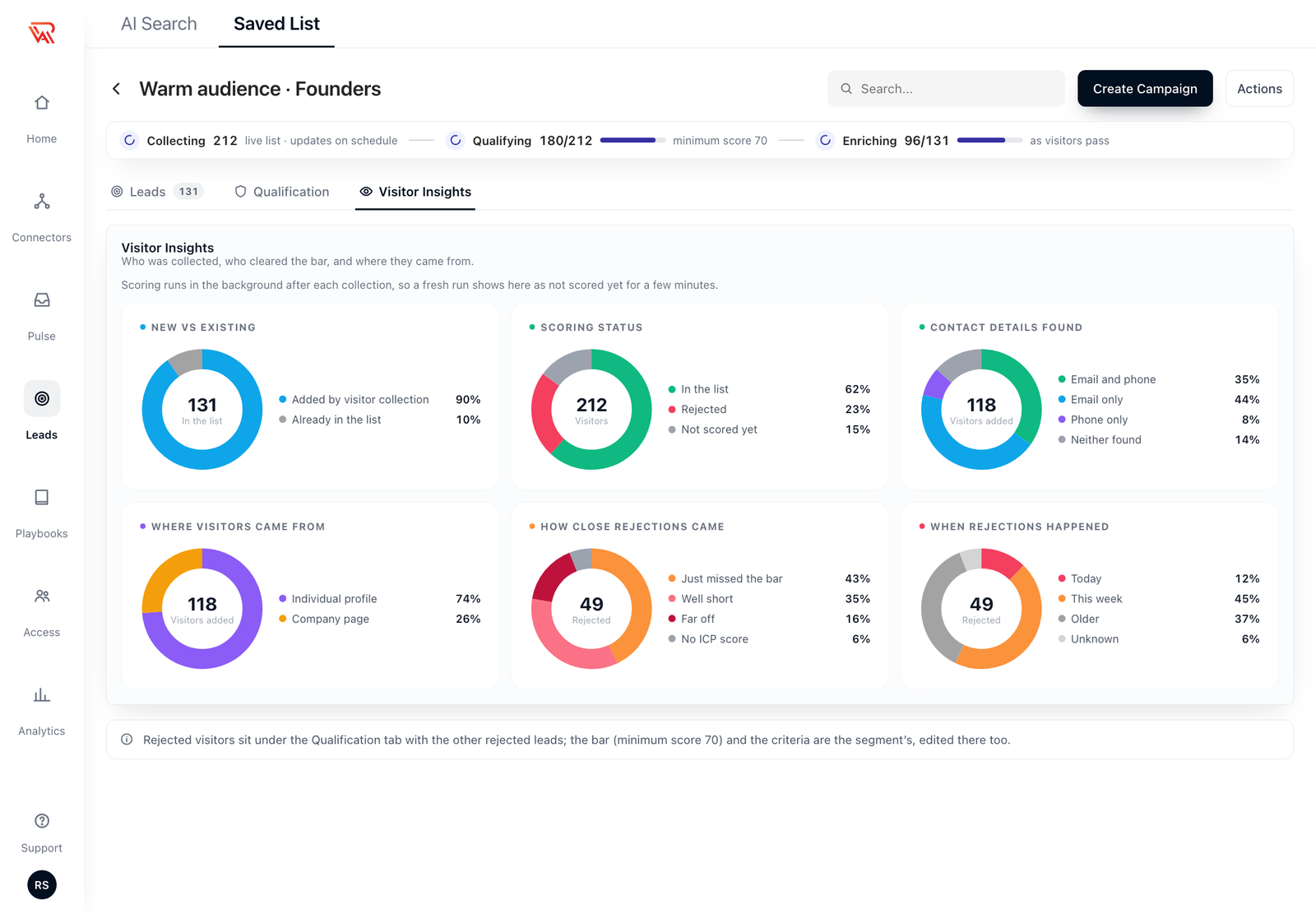
The charts
The tab shows all six charts at once:
| Chart | What it answers |
|---|---|
| New vs existing | Of everyone in the list, how many the visitor pipeline added and how many were already there. |
| Scoring status | Accepted, rejected and not yet scored, as a share of everyone collected. |
| Contact details found | Of the visitors the pipeline added, how many have an email, a phone number, both or neither. |
| Where visitors came from | Individual profile views, or visits to a connected company page. |
| How close rejections came | Whether rejected visitors just missed the bar or came in far below it. |
| When rejections happened | Today, this week or older, so a trickle looks different from one batch. |
Scoring runs in the background after each collection, so a fresh run shows up here as visitors are scored.
Where the rejected visitors are
Rejected visitors are listed under the Qualification tab, in the same rejected leads table as any other list: the score against the minimum, the reason, Qualify anyway and the filters. The same tab holds the criteria.
The minimum score and the criteria belong to the segment, and you edit them there too. There is one bar per list: the first segment that writes to a list sets it.
How visitor lists qualify
A visitor list qualifies like any other qualifying list, with these differences:
- It scores with the segment's own LinkedIn account.
- Visitors are scored as they are collected, and a pending visitor is picked up on the next pass, so nobody waits for another view to be scored.
- Collecting visitors is free. Their scoring and enrichment count against the lead sourcing budget, and while it is used up the visitors keep coming in and wait to be scored until the next cycle.
Which layout you see depends on your account. Where saved lists don't have tabs yet, the charts are the panel described on the Profile Visitors page.