Lead Sourcing
Lead Sourcing helps you discover, enrich, organize, and prepare outbound-ready lead lists from LinkedIn, the Ragworks Database and Instagram, with AI-powered search that starts from what you sell.
Ragworks combines AI search, LinkedIn sourcing, a business-data source that needs no LinkedIn account, advanced targeting filters, and verified enrichment pipelines into a unified lead generation workflow designed for outbound sales teams.
Overview
The Lead Sourcing module enables you to:
- Discover highly targeted prospects
- Start a search from what you sell: AI Search fills the filters for LinkedIn and the Ragworks Database, and Instagram takes a typed request
- Apply advanced targeting filters
- Enrich leads with verified business emails
- Organize leads into reusable lists
- Prepare leads for outbound campaigns
- Reduce bounce rates with verified enrichment workflows
Lead Sourcing Methods
Ragworks currently supports AI search for LinkedIn and Instagram, Ragworks Database, Profile Visitors, plus lead-list uploads.
AI Search
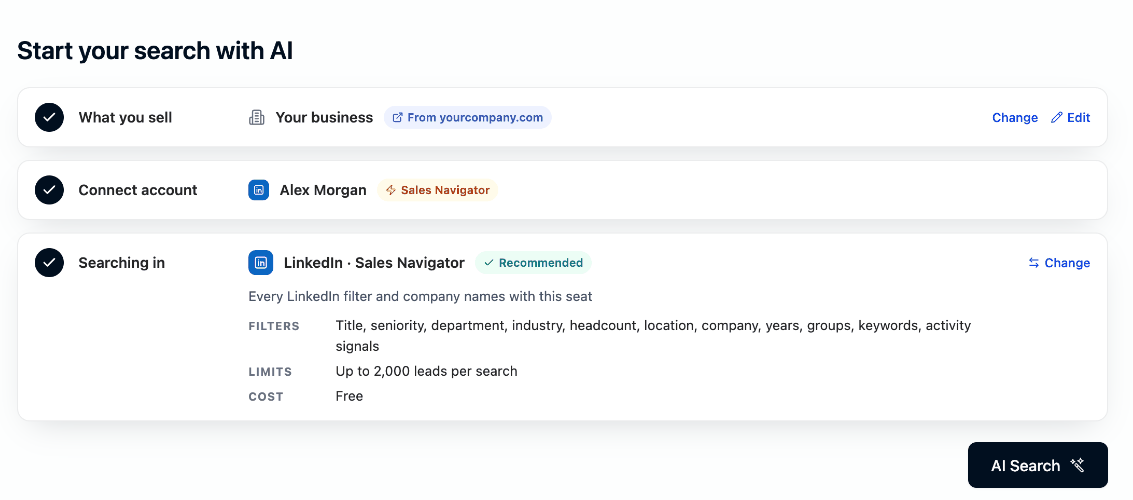
AI Search starts from your Search profile: a short description of what you sell and who buys it. Select AI Search and Ragworks turns the profile into structured search filters, shows why each one is there, and previews the leads, so there is no search box to fill in and no filter to configure.
AI Search also picks where to search from your connected account, in three steps:
- What you sell: your Search profile
- Connect account: your LinkedIn or Instagram account
- Searching in: LinkedIn when you have a Sales Navigator seat, the Ragworks Database otherwise
AI Search supports:
-
LinkedIn Classic
-
LinkedIn Sales Navigator
-
LinkedIn Recruiter Lite
-
The Ragworks Database, with no LinkedIn account
-
Public Instagram profile discovery without a connected Instagram account, from a typed request such as
Real estate creators in UAE with more than 10k followers
Ragworks Database
Find prospects from a business dataset instead of LinkedIn, so no LinkedIn account is needed. AI Search chooses it for you when you have no live Sales Navigator seat, you pick it yourself with Change in step 3, and Quickstart uses it automatically when you have no seat. It costs 1 credit per new prospect saved, and one save takes up to 500 prospects. See how AI Search picks where to search.
View Ragworks Database Documentation →
Profile Visitors
Instead of searching, automatically capture and score everyone who views your LinkedIn profile.
This workflow is useful when:
- Turning passive profile-view intent into a lead source with no manual searching
- Splitting one account's visitor traffic into several targeted lists at once
- Keeping a scoring bar so only ICP-fit visitors reach your lists
Supported workflows include:
- Daily automatic collection
- Rule-based routing into multiple named lists
- ICP scoring with at-a-glance charts and a visible rejected-and-why view
- Optional email and phone enrichment
- Automatic sync into a connected campaign
View Profile Visitors Documentation →
Bring Your Own Leads
Upload and manage your own lead databases directly inside Ragworks.
This workflow is useful when:
- Importing CRM exports
- Uploading prospect spreadsheets
- Using third-party lead providers
- Running enrichment workflows on existing lead lists
Supported workflows include:
- CSV imports
- Lead enrichment
- List management
- Campaign preparation
View Bring Your Own Leads Documentation →
LinkedIn-Powered Prospecting
Ragworks uses LinkedIn as a live professional intelligence layer for lead sourcing and outbound targeting.
Depending on your connected LinkedIn account type, additional filters and search capabilities may become available.
Supported account types:
- LinkedIn Classic
- Sales Navigator
- Recruiter Lite
LinkedIn Sales Navigator provides the most advanced targeting and search capabilities.
Email Enrichment
Ragworks can enrich leads with verified business email addresses to support outbound workflows.
Enrichment includes:
- Email discovery
- Verification workflows
- Deliverability validation
- Bounce risk reduction
This helps maintain healthier outbound campaigns and improves deliverability performance.
Email enrichment consumes Ragworks credits based on successful enrichments.
Lead Lists
After sourcing or importing leads, they can be organized into reusable lead lists.
Lead lists can then be used for:
- Campaign creation
- Outbound workflows
- CRM synchronization
- Multi-channel engagement
- Export workflows
A saved list feeds one campaign, stays connected to it, and skips leads already in another running campaign. See Using a saved list in a campaign.
Best Practices
To improve sourcing quality and outbound performance:
- Keep What you sell specific: titles, industries, company sizes and regions become real filters
- Enrich the channels your sequence needs: leads without them wait as Not reachable
- Verify ICP criteria carefully
- Avoid broad or generic targeting
- Use warmed-up outbound inboxes
- Monitor bounce rates regularly