Top up credits
A top-up adds credits to your account as soon as the payment goes through, without changing your plan. Use it when you run low before your plan renews.
How top-ups work
- You buy a fixed bundle of credits for a fixed price. Pick one from the list, no custom amounts.
- The credits are added to the credits you already have. The Credit Usage Breakdown card shows your Subscription Credits and your Add-on Credits separately.
- Each plan has a monthly limit on how much you can top up. Once you reach it, you can buy more credits next month. If you're hitting the limit often, a bigger plan is the better fit.
- A top-up costs more per credit than the credits in your plan, so a bigger plan is cheaper if you need extra credits every month.
- Top-ups are charged right away to the card you choose, and show in Billing history.
What each plan can buy
| Plan | Bundles (credits for price) | Monthly limit |
|---|---|---|
| Lite | No top-ups. Upgrade to add credits. | n/a |
| Starter | 300 for $50, 600 for $100, 900 for $150, 1,500 for $250 | $250 |
| Explorer | 1,000 for $100, 3,000 for $300, 6,000 for $600, 12,000 for $1,200 | $1,200 |
| Scale | 3,000 for $300, 6,000 for $600, 12,000 for $1,200, 24,000 for $2,400 | $2,400 |
| Pro | 12,000 for $1,200, 24,000 for $2,400, 36,000 for $3,600, 48,000 for $4,800 | $4,800 |
The list only shows bundles that still fit under your monthly limit. If you've already topped up $150 on Starter, for example, you'll see the $50 and $100 bundles.
Top up
Before you begin
Have a card on file. If you don't, add one under Payment methods.
Steps
- Open Billing.
- In the Credit Usage Breakdown card, click Top Up.
- Under Buy Credits, select the number of credits you want. The price is shown under TopUp Price.
- Under Choose Payment, select the card to charge. Your default card is first in the list.
- Select the box to agree to the Terms & Conditions and Privacy Policy.
- Click Confirm & Pay.
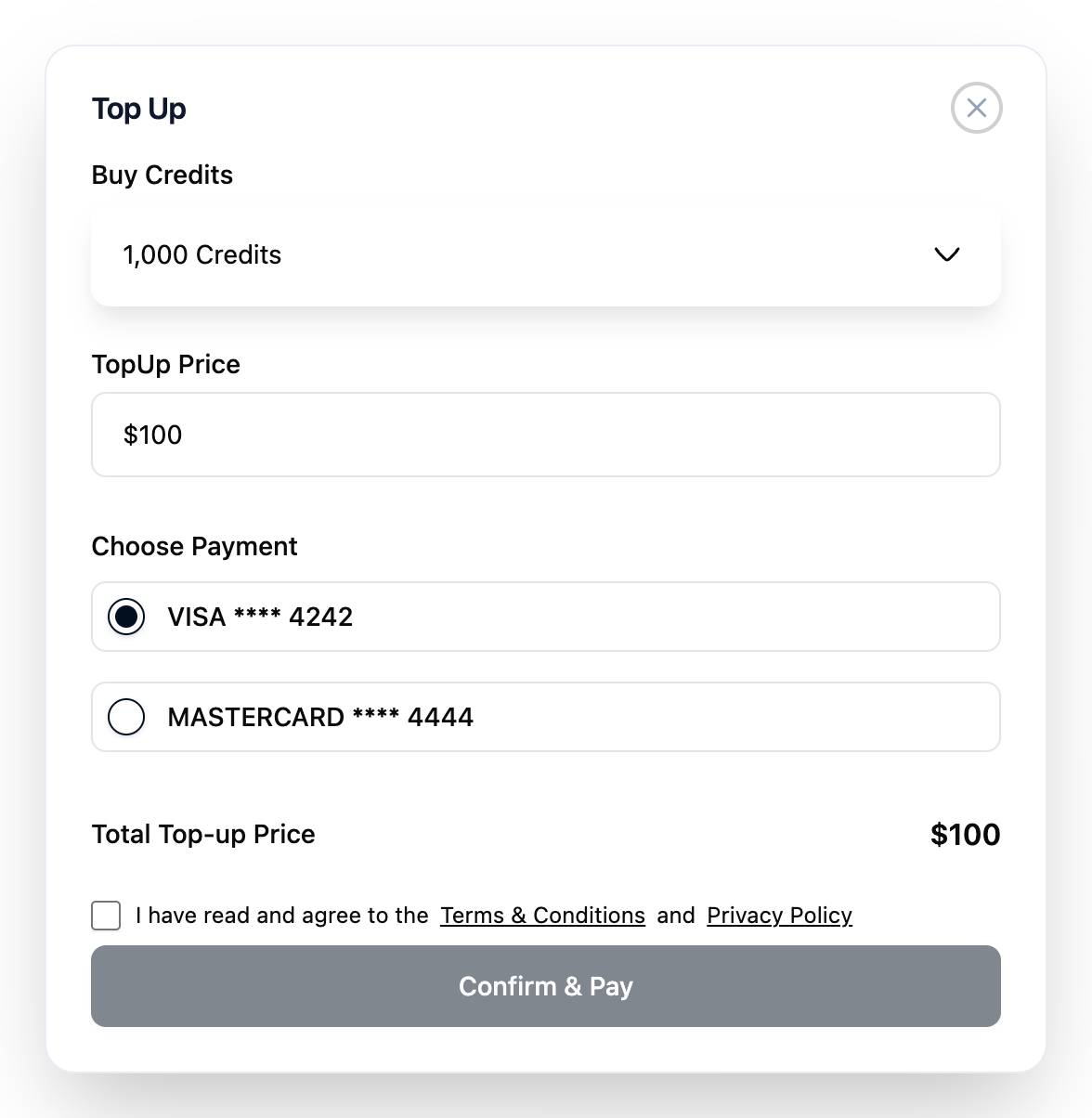
Result: a message confirms the purchase, and the credits are in your Add-on Credits.
If your bank asks you to confirm the payment, follow its prompt.
Troubleshooting
| Problem | Solution |
|---|---|
| Top Up is greyed out and says top-ups aren't available on your plan. | Lite doesn't sell top-ups. Upgrade to Starter or higher. |
| The dialog says you've reached this month's add-on limit. | You can buy more credits next month, or upgrade your plan. |
| The dialog says there are no payment methods. | Add a card under Payment methods, then try again. |
| The payment failed. | Your bank declined it. Try another card or contact your bank. |