Payment methods
Payment methods are the cards on your account. You choose one when you subscribe or top up, and your default card is the one your subscription renews on.
Open Payment Methods
- Open Billing.
- Click Billing Information, then the Payment Methods tab.
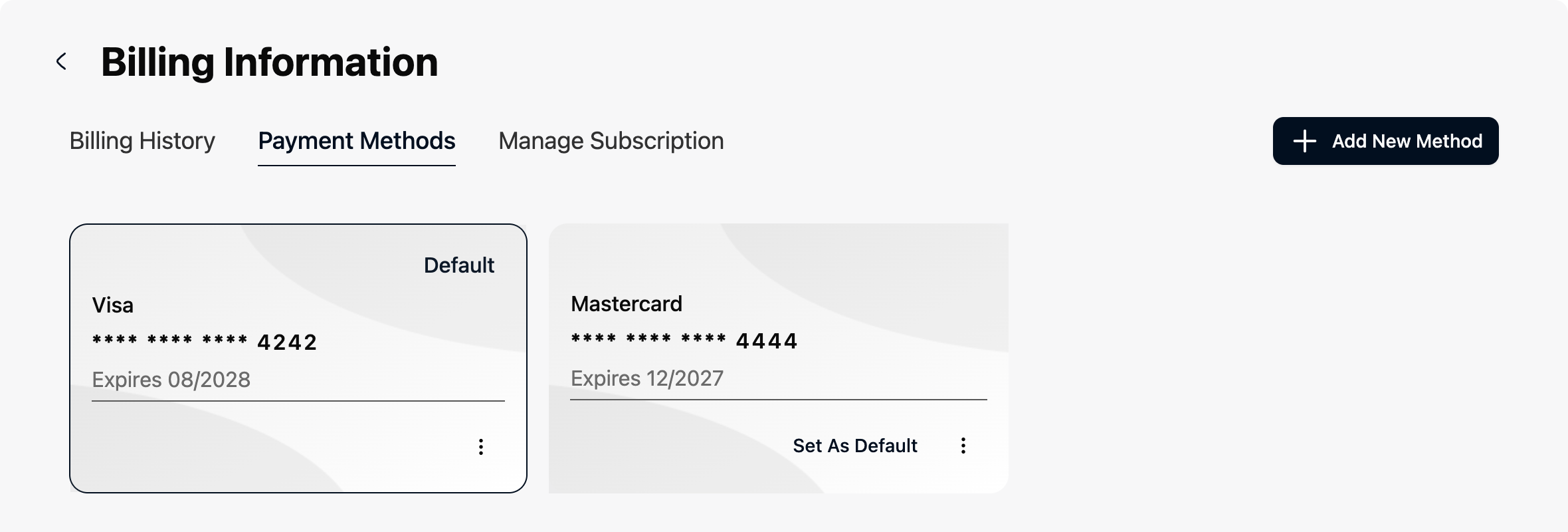
Result: each card is shown with its brand, last four digits and expiry date. Your default card is marked Default.
The Billing page also shows your default card. Click Change Default Card on it to come straight here.
Add a card
- Open Payment Methods.
- Click Add New Method.
- Enter your card details and click Add Card.
Result: you see a message that the payment method was added, and the card appears in the list.
American Express cards aren't supported. For billing questions, contact info@ragworks.ai.
Change your default card
- Open Payment Methods.
- On the card you want, click Set As Default.
Result: the card is marked Default. Your next renewal is charged to it.
Delete a card
- Open Payment Methods.
- On the card, click the three dots, then the bin icon.
- Click Delete.
Result: the card is removed.
You can't delete your only card while a subscription is active, because it's needed for the next renewal. Add another card first, then delete the old one. If you've cancelled, you can remove the last card, but you'll need to add one again to renew.
On a quarterly commitment, cancelling doesn't release the card at once: the monthly payments still to come are charged to it, so you can remove your last card only after the last of them has been paid. In the last month of the commitment there is nothing left to charge and you can remove it.
Troubleshooting
| Problem | Solution |
|---|---|
| The delete button is greyed out. | It's your only card and your subscription is active, or you cancelled a quarterly commitment that still has payments to come. Add another card first. |
| The card was refused when I added it. | Check the details, or use another card. American Express isn't supported. |
| My bank asks me to confirm a payment. | Follow its prompt. The payment goes through once you confirm. |
| My subscription renews on the wrong card. | Set the right card as default, as above, before the renewal date. |