Choosing a plan
Every plan includes a monthly pool of credits that pays for lead sourcing, enrichment, scoring and outreach. The plans differ in how many credits you get, how many accounts you can connect, and how much help you get from the Ragworks team. Pick the plan whose credits cover a normal month for you, and use a top-up for the occasional busy one. Then pick a term: how long you commit to, and how you are billed.
The plans
| Plan | Credits each month | About this many qualified leads | Connected accounts (LinkedIn accounts or email inboxes) | Users |
|---|---|---|---|---|
| Lite | 1,000 | 160 | 2 | 1 |
| Starter | 3,000 | 540 | 3 | 2 |
| Explorer | 15,000 | 2,700 | 15 | Unlimited |
| Scale | 30,000 | 5,400 | 30 | Unlimited |
| Pro | 60,000 | 10,800 | 60 | Unlimited |
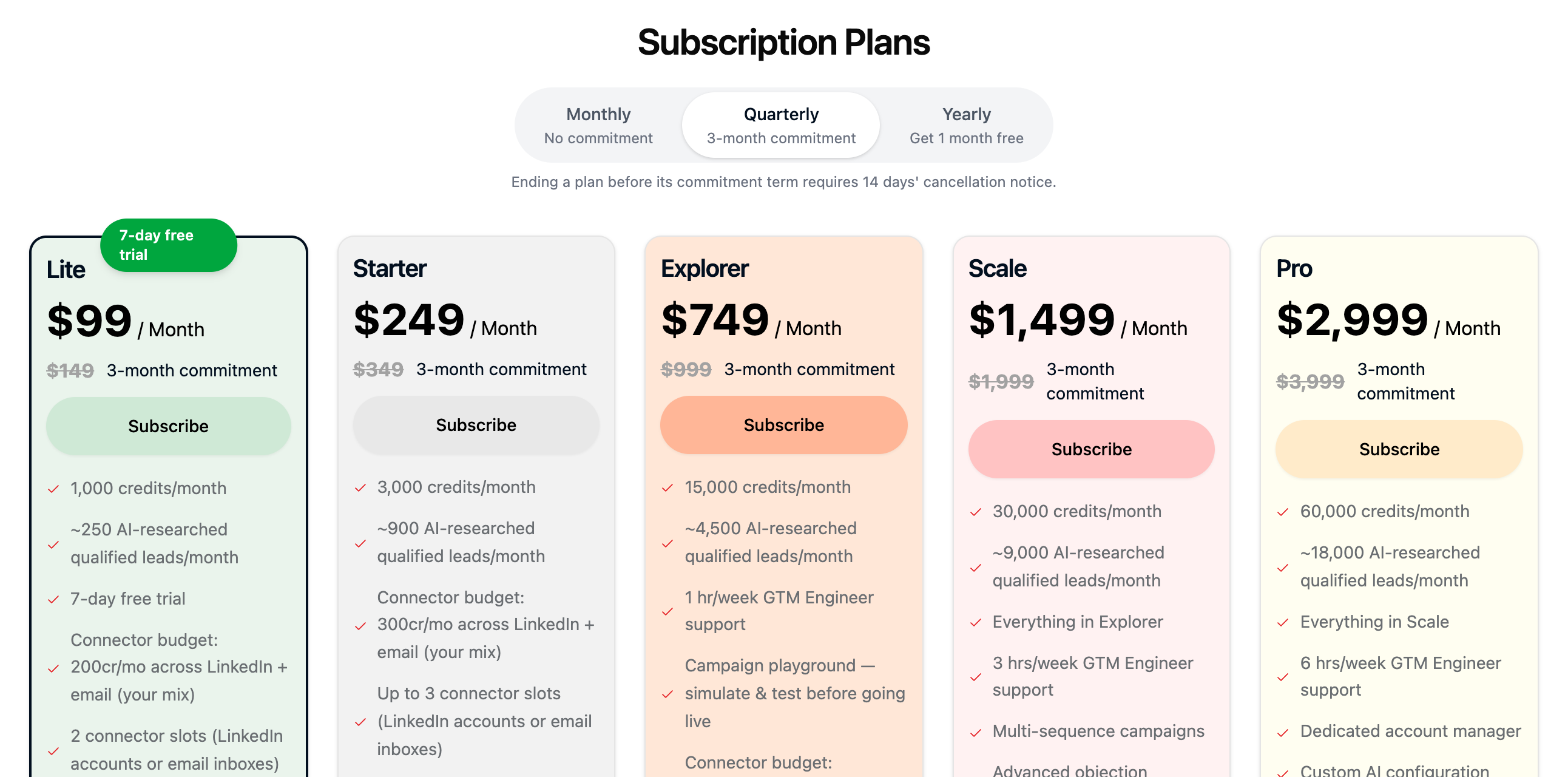
The plan cards on the Billing page always show the current price and the full feature list for each plan, and the pricing page has a side-by-side comparison. For a larger team or a custom setup, use Connect with Sales at the bottom of the Billing page.
The lead counts are estimates. They assume about 5 credits for each lead, scoring and research included, and set aside the credits your connected accounts use. Credits are charged for what was actually done, so the number you get depends on how much of your credit you spend on each kind of work. See How credits are counted.
Your plan also sets how deep an AI-written message can research a lead: up to Standard on Lite and Starter, and up to Deep on Explorer, Scale and Pro. See Research depth and hooks.
Monthly credits don't roll over
Credits from your plan are for the current billing period. Unused plan credits don't carry forward to the next one.
Choose a term
Use the three tabs above the plan cards. Quarterly is selected when you open the page.
| Term | What it means | Notice to cancel |
|---|---|---|
| Monthly (no commitment) | You are billed every month and can stop whenever you like. It costs about one month more per quarter than Quarterly. | 7 days |
| Quarterly (3-month commitment, billed monthly) | You commit to three months and are billed monthly: one charge when you start and one a month and two months later. After the three months the commitment renews for another three, unless you cancel. | 14 days |
| Yearly (get 1 month free) | You pay once a year for 11 months of the monthly price and use the plan for 12. | 30 days |
Lite is sold on Monthly and Quarterly.
The line under the tabs states the notice period for the term you have selected. See Cancel your subscription for what the notice means.
Prices
Each price below is per month. On Quarterly the plan card shows this price with the Monthly price struck through beside it. On Yearly you pay the yearly total once.
| Plan | Monthly | Quarterly | Yearly, per month | Yearly, paid once |
|---|---|---|---|---|
| Lite | $149 | $99 | Not offered | Not offered |
| Starter | $349 | $249 | $228 | $2,739 |
| Explorer | $999 | $749 | $687 | $8,239 |
| Scale | $1,999 | $1,499 | $1,374 | $16,489 |
| Pro | $3,999 | $2,999 | $2,749 | $32,989 |
The plan cards are the source of truth for what you pay today.
What a quarterly commitment is
A quarterly plan costs the Quarterly price every month for three months. The three charges are dated at checkout, and Manage Subscription shows the window you are in, for example Commitment: Oct 15, 2026 – Jan 15, 2027 · Renews Jan 15, 2027. At the end of the window the commitment renews for another three months.
Cancelling a commitment stops it from renewing. It doesn't cancel the monthly charges that are still part of the three months you committed to: see Cancel your subscription.
If you subscribed before quarterly plans existed, your plan has no commitment, and nothing about it changes.
Free trial
Lite has a 7-day free trial for an organization that has never subscribed. The checkout shows the date the trial ends and the date your card is first charged. On Quarterly, the three monthly charges start when the trial ends.
Subscribe to a plan
- Open Billing.
- Choose Monthly, Quarterly or Yearly.
- On the plan you want, click Subscribe.
- In Checkout, select a card, or add one with Add new Payment Method.
- Select the box to agree to the Terms & Conditions and Privacy Policy. On Quarterly the box also says you agree to a 3-month commitment billed monthly.
- Click Proceed to Payment.
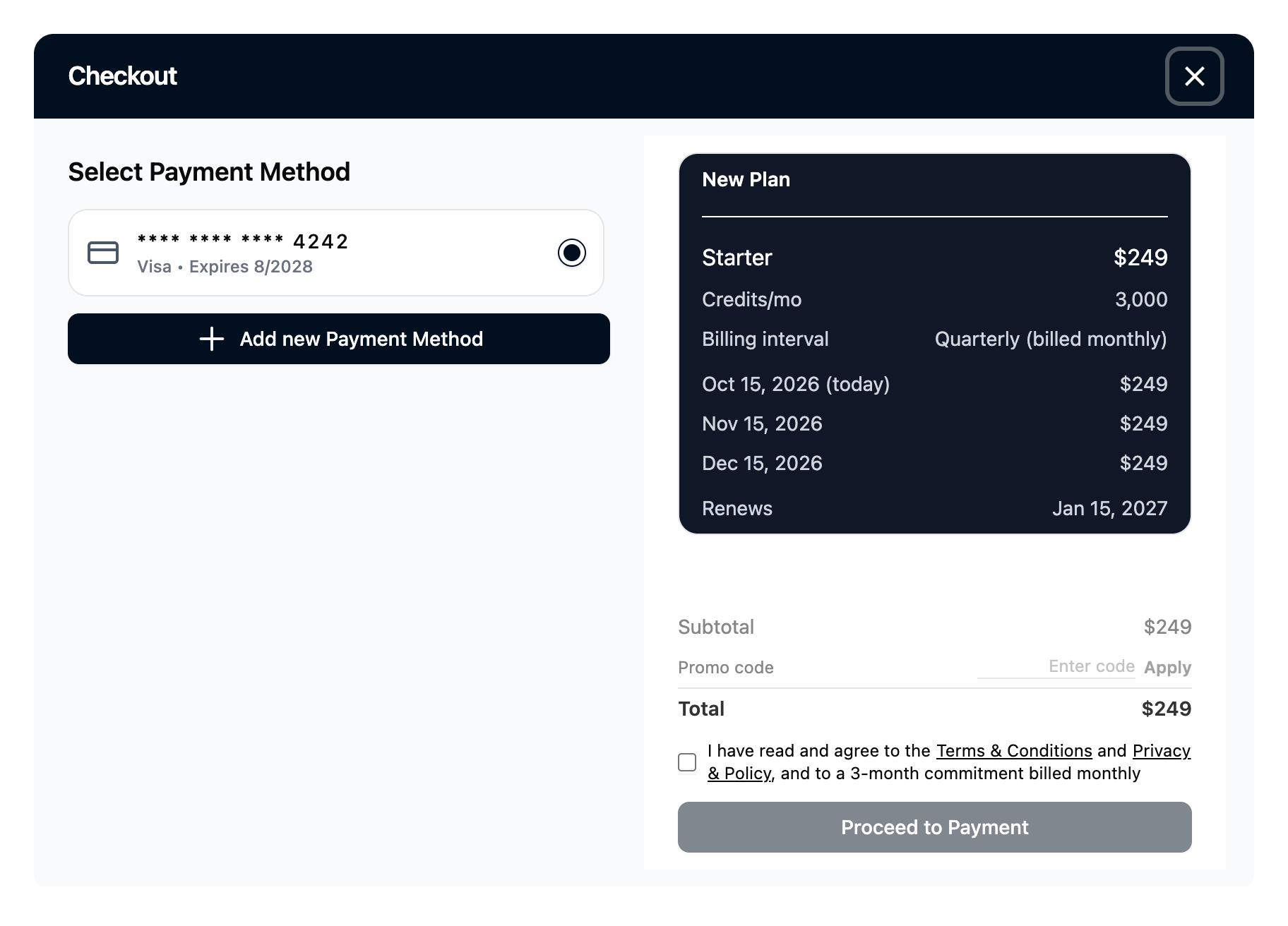
On Quarterly, the New Plan box shows Billing interval: Quarterly (billed monthly), the three charges with their dates, and the date the commitment renews. Total is what is charged today.
Result: the plan starts. The first time you subscribe, Ragworks takes you on to setting up your account.
Upgrade
You can upgrade at any time, to a bigger plan or to a longer term. On the plan you want, click Upgrade. Checkout shows the amount due and when the change starts. Click Confirm & Pay.
- A bigger plan starts right away, at the term you are on.
- A switch to Yearly starts right away.
- Monthly to Quarterly starts at the end of your current month, when the commitment begins. Checkout shows Starts and the date, and nothing is charged now.
- A bigger plan and a different term together: the bigger plan starts now on the term you are on, and a line such as Then Explorer Quarterly from Nov 15, 2026 says when the new term follows.
Result: the change starts as Checkout showed.
Downgrade
On the plan you want, click Downgrade. The same applies to a shorter term: Quarterly or Yearly to Monthly, or Yearly to Quarterly.
- Read the message and click Continue. A downgrade doesn't happen right away: your current plan stays until the end of your current term, and the lower one starts after it. The message shows that date. On a quarterly commitment it is the end of the commitment.
- In Checkout, click Confirm & Pay.
If the lower plan allows fewer connected accounts than you have now, Ragworks asks you to pick the accounts to disconnect before it goes ahead. They are removed when the new plan starts, along with the agents connected to them, and campaigns that were using them are marked complete.
What your plan card tells you
On the Billing page, the top card shows the plan you're on and one of:
- Renews on: the date your plan renews and your card is charged.
- Expires on: you cancelled, and this is the last day of access.
- Expired on: your subscription ended.
The ring shows how much of this month's credits you have used. When you're running low, the card tells you to upgrade or top up. The plan that shows Current is the one you're on.